For the first time - 100% Arabic messages

In the beginning, I would like to know that there will be no way to properly localize the phone except through Apple, and the reason for that is that the Arabic language needs special tools that work to differentiate between separate and continuous letters, as well as reversing the direction of speech from north to right and other like movements on letters. While we are awaiting this Arabization, which I do not expect to be officially issued before at least a year, we are making a simple effort to solve our daily problems with the phone, and among these problems that it is urgent to have a quick solution is reading and writing Arabic messages ..

As for reading the messages, there were several attempts, including the brother's attempt MEM9 And he was the first to put forward a solution to the problem by placing a PHP server on the phone, and by using this server it creates a PHP page that reads from the message database, and the problem with this method is that you put on the phone many programs that take from Program space on the phone And also the problem that many noticed is that the phone battery drains quickly because the PHP server is always running.

The second method is considered the easiest to install on the phone I presented it here beforeHowever, this method has the same disadvantages as the previous method, and the only advantage is that it is easy to install and that the PHP server works from within the aSMS program, but in the end you are forced to run external programs to read messages.

Now, praise be to God, for the first time, you can read Arabic messages without external programs, and I will explain how, simply. There is a program that reverses the Arabic letters in the message database and it only works when you open the regular messaging program from your iPhone, so you can read Arabic messaging is very easy from the original iPhone program without any consumption of phone resources.
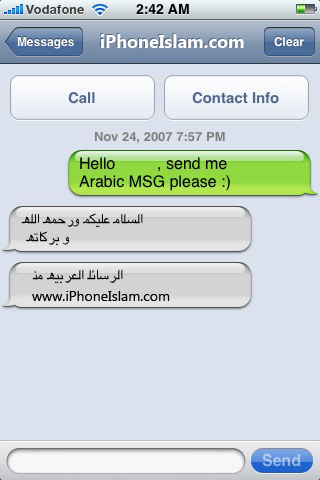
All you have to do is ..

  1. Open Installer (Look here if you don't know how)
  2. Click on the Sources icon at the bottom on the right, then the Edit button, and then press the Add button
  3. Write this website to add it (http://apps.iphoneislam.com)
  4. The program will add the site to the program’s resources, then click on the Install icon at the bottom on the right
  5. Go to the (iPhoneIslam) section, then tap (Arabic Font)
  6. Click on the Install button at the top on the right
  7. Once again go to the (iPhoneIslam) section, then tap (Fix Arabic SMS)
  8. Click on the Install button at the top on the right
  9. Close the (Installer) program.

Enjoy Arabic messages, you don't even need to restart the device.

This method is modified from the same method of the Hebrew letters from iHebrew

 

103 comment

comments user
Ghayath

Every hour every day every week every month every year every year and you are a thousand good

comments user
unknown

Hello
Many thanks for your website
how can i help you to make persian keyboard
Because your brothers in Iran need a Persian font

comments user
boss

i couldnt instell the arabic sms, i did everything but the i phone says i cant run on my firmware try isms, can u help

________________________

Blog administrator: Read this post
http://www.iphoneislam.com/?p=65

comments user
yousef

Wonderful thing my friend!

How do you remember the virtue of the Jew and forget the virtue of the Muslim?

I do not know that the font you use in this source is not your own making, however you did not mention and did not report any news or allusion about that?

I hope that it was forgotten by mistake.

* The font arose after what Brother Ryan published on his site, then it was developed by Muhammad Meliani in his blog, then on the Macintosh software website, it was developed to be in this way

comments user
Rody

IPhone model 1.1.3 does not accept arabic fix Is there a solution?

comments user
someone

On which version does this program run? Please respond. Does it work on version 1.1.3, 1.1.4, or 1.1.2?

comments user
MOo || heart || oODi

I have Virgin 1.1.3 ,,, the messages come to me in Arabic, but I have the words, what is the solution?

.

.

Please help, please

And in solving the right of mms messages ??

comments user
أنا

Does it work on 1.1.4

Please reply

comments user
Khaled

Hi,

I downloaded Arabic letters on 1.1.4 and it works fine with sending, unless someone sends messages in Arabic and they appear inverted as well, is there a solution for that, please help. Arabic sms fix not supported with firmware version.

comments user
unknown

Frankness

Amazed the world with the unexpected development of the iPhone Islam

everybody in US got amazed with what u have created

Thank you guys we pass it on to this program and its continuous development

comments user
Tariq

i have 1.1.4 ...

donwloaded arabic fonts… but the rest of applications are not working… im having a message saying cant install on this firmware .. plz help

comments user
Sultana

My brother, the engineer, the author of the topic, I suffer from the same problem as my sister Reem, version 1.0.3

When writing the letter, there is no problem, only !!!!!

Incoming messages come upside down ... Please help me please

comments user
Reem

God bless you

But the words came upside down with me

It means from left to right and not from right to left

What is the solution to this problem??

And God makes it in the balance of your good deeds

comments user
Fahad

May Allah reward you well for the effort and my problem is the same as NAFO

comments user
Abu Ali

May Allah bless you and reward brother Tariq abundantly. I had the same problem as the brothers above, but thank God I was able to download the program and use it. I deleted apps.iphoneislam.com & arab fonts & Arab key board and all others arab supported programs like Athan & iazkar, then I downloaded the programs according to the instructions written above. The mobile must be completely turned off by pressing the button at the top of the device for 3 seconds and turning off the power off slide, then opening and closing it twice. The program will not work if I only use the power off button at the bottom of the device

comments user
Shamlan Al Kithy

May Allah reward you. My problem is the same as NAFO.

comments user
SUBSCRIPTION SALE

May Allah reward you well for the effort and my problem is the same as NAFO

comments user
Abdulrahman

Brother NafO, unfortunately this fix is ​​not compatible with version 1.1.3

We hope to solve this problem quickly :)

comments user
NafO

I downloaded Arabic Font, but when I downloaded the fix arabic sms, it didn’t download because the version is 1.1.3. I hope someone helps me with this thing

comments user
Amin Ahmed

I downloaded the software from http://apps.iphoneislam.com But the messages open and close the connection automatically as well. What's the solution.

Version: 1.1.2

What's the solution

comments user
IBADER

iam having 1.1.3v and i want to read arabic msgs please so please let me know the way for that

comments user
iUser

Peace, mercy and blessings of God:
I downloaded the Arabic calligraphy and it was tuned with me, but the keyboard did not work and neither did the Arabic letters fix. When running preflight, the download is interrupted and the main screen appears.
Please Help
___________________________
Blog manager: If you are using version 1.1.3 then Fix Arabic SMS will not work for you, and if your version is not otherwise, try to delete the source and then re-enter it again
As for the keyboard, please read the comments on the keyboard theme

comments user
saher

God bless you
I want to mention a problem that occurred to me in version 111 on more than one iPhone, which is when I want to install fix sms it starts downloading and suddenly it comes out to home without installing it
Is there a solution ????

comments user
unknown

To download the Fix Arabic SMS file, specifically when the Running preflight process, the download is interrupted, Choi is suspended, and the main screen appears

comments user
iHazim

Hi,

Please Help …

When I try to download the Fix Arabic SMS file, specifically when the Running preflight process, the download is interrupted and the main screen appears.

And when converting the keyboard to Arabic, the same problem occurs !!

Greetings

comments user
HussainNo

I'm using the iPhone with on 1.1.3 and I installed SMSD but it wouldn't lunch 🙁

comments user
the hulk

Finally the iPhone in Arabic

may God bless you ….

comments user
salrh

i have the new virstion of the iphone it says that cant be installed ,,, can you please advise what to do

__________________________

WebMaster: You can not install Arabic Fix on 1.1.3, please use programs like SMSD to read Arabic messages ..

comments user
Rummy

Does it work with 1.1.2 because it returns to home when installing fix Arabic sms

comments user
ooooo

I tried it, but I don't see it upside down, but for those who receive the message, they see what justice is possible.

And if they spray, I will show me in Arabic, but upside down

Please help

And it gives you wellness

comments user
Ali

Brother Tariq

Hope you will help us in localizing version 1.1.3

Keyboard and messages do not work on OBT 1.1.3

God put them in your good deeds

comments user
طارق

Software does not work with latest version 1.1.3

Just FYI.

comments user
Triple A

God bless you

comments user
ooooo

I am suiiyeh with a few seasons now, I mean, I can deactivate the Arabic letters

comments user
unknown

Peace be upon you all. Question: Does the new version of the Arabic keys work on iPhone 1.0.2? May Allah reward you. Don't forget to pray for our brothers in Palestine and everywhere.

comments user
qtrih-cool

Peace, mercy and blessings of God

I am grateful for the effort exerted very much, and my veto and my sufficiency

I have a problem if you can help me by being so grateful to you

I have version 1.1.3. The important thing is my problem is the Arabic messages. The iPhone I have it receives Arabic and Kibor Arabic after it, but the letters are dispersed, such as:

what is the solution ?….

Greetings to you

comments user
AmoOon

thanxx i was waiting 4 this = D

comments user
roimsa

Peace, mercy and blessings of God……….

I have an iPhone on Virgin 1.0.2...How can I upgrade it to 1.1.2 or 1.1.3 without it locking up?

Also, my brothers, how were you able to fix the Eighton to it? Everything that I hooked up to the weaver with the necessity of uploading the new copy and fixing it, and of course it was notified that the device was executed and what it was able to put down any need on it ... One last thing from how many days the ringing of the call disappeared when a call came, it must be Put the phone in front of me so that I can see it when it lights up and it is not at all reasonable ... ... Please help. And you are good

comments user
Badr

Brothers, I opened 1.1.3, but the questioner does not receive at all, and there is no ringing sound if someone calls, or the alarm. Is there a solution? May God reward you with good news and grant victory to our brothers everywhere.

comments user
Alaa

God bless you, may God increase you and increase your knowledge

comments user
safwani

Gents ... .i still have the VERY VERY major problem the letters are still not connected and theey don't end proberly..so any help

comments user
Abu Abdullah

A scented greeting with thanks, brother Tariq
We hope that you will work on adding this same localization to the iSMS program, as it has the feature of forwarding messages.
And just the word thank you does not at all fulfill what you have provided to the Arab user of the iPhone

And accept my sincere regards

comments user
Ahmed Al-Ajeel

Really, a rose of thanks for the effort that I think faced difficulties in the beginning, and also a nice idea for a person to follow the efforts of colleagues of non-Arab nationalities and convert them to Arabic... I extend my sincere thanks to the brother, and even if some brothers mentioned that the program caused problems for them in their programs, they reprogrammed it to the first version and tried again, and this remains an experiment that succeeded with most of the brothers and served them, and may God reward you with good.. If there was a link to Donate, we would have donated and thanked my dear brother again

comments user
ganometry

forb the guy who said that (no edit in installer Sources in version 1.1.2)

To solve this issue click on the update at the top of installer interface. The installer will be updated and u can see edit there

comments user
hitham64

God bless you and your wonderful effort and boom

comments user
Ahmed

How to write the letter Alaa Hamzah
And thanks for the Arabization effort

comments user
shakal

many thanks

comments user
haitham

May Allah reward you well and make it in the balance of your good deeds.
And thank you for this tremendous effort.
Indeed, they have proven that Muslims are only lacking in perseverance at work.

comments user
Riyadh

Many thanks bro i do that i install your App. really it's good

comments user
nasser4u2

May God reward you a thousand good and may God grant you success, except for what is good

comments user
iYousuf

Forward my fanciers

Is there a way to read the names correctly ??

comments user
Ali Sharhri

In fact, you are a source of pride for us as Arabs, with the presence of such mentalities. Words of thanks may not be enough, so thank you :)

comments user
Vermin

Is there any way for iPhone to receive and send MMS messages ??

comments user
Ahmed

hello there,
I am having a problem getting the arabic keyboard to work. My phone has the 1.1.1 version and i did fallow you instruction, but for some reason it didn't work
Please help if you can

Thanks
Ahmad.

comments user
fahad

There is no edit in installer Sources in version 1.1.2

What is the solution, my brothers

comments user
faris

Hello guys, please can someone help me with how I can read messages in Arabic, as I have done the following steps: Open the Installer program (look here if you don’t know how)

Click on the Sources icon at the bottom right, then the Edit button and click on the Add button.

Write this website to add it (http://apps.iphoneislam.com)

The program will add the site to the program’s resources, then click on the Install icon at the bottom on the right

Go to the (iPhoneIslam) section, then tap (Arabic Font)

Click on the Install button at the top on the right

Once again go to the (iPhoneIslam) section, then tap (Fix Arabic SMS)

Click on the Install button at the top on the right

Close the (Installer) program.

But the issue is not with me, please advise me of the solution

comments user
naive

May Allah reward you and I ask Allah Almighty to grant you beneficial knowledge and righteous deeds, my brother. The iPhone weTools program is very wonderful, but there is a problem with its simplicity, and I think the solution is in your blessed hands, God willing. When I do a “re-send” message, it is sent in reverse and the other party receives it in reverse as well.

comments user
nightsoul

May God bless you, protect you, and give you

comments user
alzadjaliboy

Thank you

Lapping gives you wellness

We are waiting for the new from you

comments user
Fahad Juma

THANX Million time for your greateffort

I know this is the start and many more to come with your effort

comments user
firm

Peace be upon you,

If you please, can you give us another way, because I am browsing from Libya, and your website is blocked in Libya.

So, I hope that you will come to us and give us another way.

comments user
snow

my SMS not working at all Please somebody find us solution for this problem ??

comments user
ahdaab

Everyone we want a solution for sending messages in an inverted way via weTool

comments user
snow

I still tried your method, and it worked for me, but at the same moment the MSS broke down and I could not open it at all !!!!

comments user
dxprince

hts working 100%

comments user
ahmed

God bless you

comments user
Hussain

y36eek alf alf 3afyah o5ooy 6arig ...

I swear to God, you are so kind… 🙂

comments user
unknown

Hi

In the beginning, may God reward you well

My dear brother, the program works perfectly, but I have one comment: after a while, some messages appear reversed.

comments user
basemgawish

If there is any Arabic and English text in the same message, the letters appear completely upside down

thx

______________

Blog administrator: This is really true, and we hope to find a solution to that soon

comments user
naive

Thanks for the program. May my dear brother solve the smsd problem because this program is important for deleting messages and making it for resend.

_____________________

Blog manager: Use a program called iPhone weTools, look for it on the Internet, it is better than smsd

comments user
Mishary

Peace, mercy and blessings of God

By God, you are defiled.

I ask God to give you good every second and to the Imam …………

Question / Delete ArabicSMS ?????

comments user
Sleep lover

Dear Tariq

We all thank you and praise you

But the issue of deleting responses is transgressive

As if you stone our freedom and interfere with what we say

We have the absolute right to what we say

You may or may not like it

I don't think you have the right to delete whatever you want because you don't like it

Because the deletion and quarantine is the work of my intelligence

I have the best of intention in you, and I personally have benefited from your efforts, and I cannot do without them,

To you my best regards

comments user
unknown

Hi

I deleted my post and I was thanking you for your efforts

God forgive you

_________________________

Site Manager: Guys, don't you excuse those who work to serve you? This is the third comment about someone who complained about their comment being deleted!! Do you want to brag with this comment or do you want to send thanks? I think well of you and say that you want to thank me, and what makes me happiest is your thanks to me, and what makes me work most is your appreciation for me, but if I delete your comment, then don't worry, the thanks have arrived and are in the heart and not on the blog :)

comments user
Sleep lover

I repeat

I do not claim that the program disables the device

But I will say that my device crashed after I downloaded your software

The holidays may or may not be yours

greeting

comments user
Sleep lover

Dear Tariq, why did you delete my post and keep those who praise you and praise you? !!!

I tried your method, and it worked for me for a day, and after that, MSMS crashes

The malfunction may not be from your programming

But why did I delete my post that narrates my experience?

At least let it be until others read it and make their own decisions

But to leave posts of praise and thanks and delete complaints, this, by God, is far from justice, honesty and integrity.

I thank you for volunteering and serving you

But as I allowed yourself to make fun of a topic about the Arabs of the device, let me reveal what happened to me

And with my inspiration, I did not attack you or criticize you

finally

You speak about Islam in every line of your lines and remember God in every sentence of your sentences

Your faith does not give you the ethical obligation to the consequences that your programming and your method causes

Greetings

comments user
fathi

God bless you

comments user
HOLSTEN

The method did not work for me??

I don't know what's wrong..

comments user
sphinx

By God, you are a hero

God bless you

And make it in the balance of your good deeds

comments user
basemgawish

thank you very much

comments user
faeedon

Klaam kbeer ya ba6al

comments user
vandamos

realyyyyyyyyyyy big kisssssssssssssssssss and thkkkkkkkkkkkkkk

comments user
mode

Thank you for the very good efforts. highly apreciated.

comments user
unknown

Hi

In the beginning, may God reward you well

Dear brother, do you have any requirements for the program (download Arabic calligraphy, for example) as the program did not work with me?

For your information, my device is version 112 unlocked, and one of the brothers mentioned that he used the same version with it.

comments user
hitham

God is there, expert on the iPhone

comments user
unknown

There is a problem with the program if the Arabic message contains English text, for example, a mail address, a website address, or a person's name

The important thing is if there is any Arabic and English text in the same message, the letters appear upside down exactly as before

comments user
Ahmad

Thank YOU

Thank YOU Thank YOU Thank YOU Thank YOU Thank YOU Thank YOU Thank YOU Thank YOU Thank YOU Thank YOU Thank YOU Thank YOU

I tested it in 1.0.2 and it's working

the emails and the web :)

comments user
monty

That's great...Thank you

comments user
Summer

beautiful creativity

with greetings

Summer

comments user
Omar

I can now see this website on iPhone in Arabic good job man

comments user
ابراهيم

Peace be upon you, I thank you very much for the effort and thank all the efforts based on Arabization.

This method is very clear, and the look of the messages is more than wonderful.

We are only missing an Arabic keyboard.

comments user
iNouf

Amputated response Ha

God bless you and a thousand thanks

comments user
desperado

Beautiful creativity, may God reward you for what he loves and pleases

comments user
iNouf

You feel the people of the people

Finally, his money is necessary. I continue to train my brain, and I read the opposite

comments user
Mohammed

Peace be upon you …,

The method works on version 111

comments user
Smart1991

May God give you a thousand health.

The method works 100% ... And we wait for a way to make the endings of the words complete ...

May Allah reward you

comments user
x

Nice thing, but unfortunately I discovered flaws in the program: -

1- I received a message with a number and my father called the number previously. The number appears in a blue line. I press it. Calls, but now the number is not as if it is part of the speech.

2- I used to use the line and the smsd program to read messages from right to left, and now smsd reads messages from left to right like sms previously reads upside down

And the pros

1- Reading messages from SMS is better and more beautiful

2- There are many programs on the device

Receive your blessings

comments user
ahdaab

I swear by God, I will not go to the Imam

comments user
Ali Al-Anzi

I congratulate you for this wonderful excellence .. and I wish you more prosperity ..

comments user
unknown

Receive your oath, sir

comments user
appleapps

Hey, coyyyyes

Finally the problem was solved without programs and a headache ..

What we are missing is to write the letters, their endings are complete, and the iPhone becomes and responds.

Thank you, site team

_________________

Site administrator: Thank you, brother. This is not a great effort, it is only modifying a method that already exists. As for the real effort, it is what you spend on your page to help the beginner and the professional, God bless you

comments user
Abu Thamer

may God bless you

Thank you, dear

So is the job

comments user
BiOSS

May Allah reward you for your efforts, but please clarify which version the program works on.

comments user
Isaac

A thousand thousand thanks honestly a 100% successful way.

But is there a way to edit the names so they are from right to left in the contacts list?

Leave a response

We are not responsible for any misuse of the information mentioned above. IPhone Islam is neither affiliated nor represented by Apple. IPhone, Apple and any other product name, service names or logos referenced herein are trademarks or registered trademarks of Apple Computer.

العربية简体中文NederlandsEnglishFilipinoFrançaisDeutschΕλληνικάहिन्दीBahasa IndonesiaItaliano日本語한국어كوردی‎فارسیPolskiPortuguêsРусскийEspañolTürkçeУкраїнськаاردوTiếng Việt

