As you know, every device has an operating system, for example PC devices can run on Windows or Linux, Mac devices run MAC OS, iPhone phones, iPod touch devices, and iPads, the operating system is called iOS.
 The iOS operating system in its fourth version presented us with one of the new distinctive features, namely Folders, with which you will be able to organize and arrange your many applications inevitably due to the increasing number of programs in the application store day after day (more than XNUMX thousand applications)
This new feature allows you to store about 2160 applications after it was only 180 in previous versions .. Where you can now group similar applications into folders by drag and drop, and this greatly improves accessibility and the user interface.
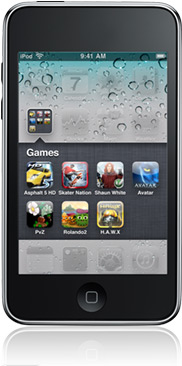
How to create a folder
- Just click your finger on an application and hold down as you did before when deleting programs.
- When the apps start to vibrate, drag the app you want to place it in a folder and place it over a similar app, then release it.
- This will create a folder containing two applications, and in the same way, drag another similar application and place it over the folder to include it.
- Return to normal mode by pressing the Home button, now when you click on the folder icon it will open for you and show the applications contained in it for you to choose from them as you like.
Fact 1: The folder contains a maximum of 12 applications
Fact 2: Even if there is no room on the screen of your device for a new application that you have downloaded, you can run this application through the search for programs feature in iOS
This article is part of a group of articles that will be directed to beginners, if you are a beginner The section may help you



101 comment