We continue to display secrets that many users do not know about the iPhone, which makes us make sure that this device that is in our hands still carries a lot of secrets and secrets that we do not know. Although it was released nearly five years ago, a large number of users were surprised by its feature Call forwarding via codes Although it has been in existence since the device was released. This is in addition to Many other benefits And the subtleties that exist in the operating system Like showing and hiding apps Purchased. We continue to talk about a new feature available on the iPhone, which is knowing detailed information about the network from the field test application and converting the call quality indicator into numbers and not tapes.
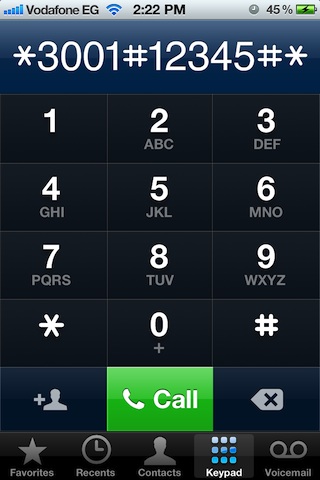
Open the connection and type
* 3001 #12345 # *
As the picture:
The Field Test application appears, and it includes detailed information about the network in your phone, but most of this information is of interest to communication professionals. You can also know whether your device is connected to the second or third generation networks. For example, if your phone is connected to the third generation, you will find that there is information when you log in to UMTS, if you enter GSM, you will find UnKnown and vice versa.
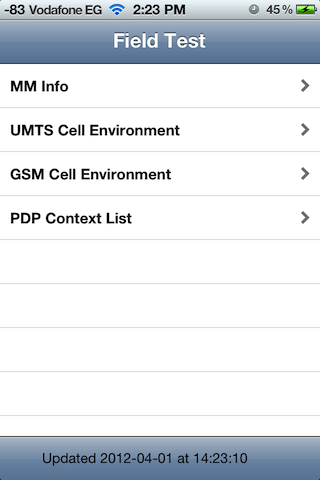
But what matters to us here as users is that the network at the top has become shown in numbers and not conditions like the traditional method, and this matter is more accurate as it displays the gradation and quality of networks and you can identify whether holding your hand to the phone or your presence near certain devices affects the network and its quality or not, as the numbering gives greater accuracy ... But note that the numbers always appear negative, and the more negative the number is, the better, for example -80 is better than -100 and so on.
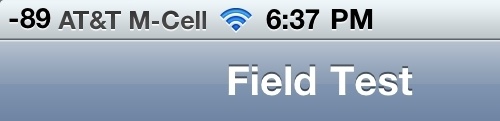
But just exiting this list reverts back to the traditional signs. If you want numbers to remain after you exit the Field Test, as follows:
- Enter the Field Test as previously explained.
- Press the power button until you see a pull to close.
- Press the home button for a long time until it returns you to the home page, and you will find that the highest quality of the network has appeared with a number.
- You can move between the grid and the numbers by touching the grid to switch to the numbers and by touching the numbers to return to the network signals.
This video demonstrates the previous method:
If you want to switch back to the traditional signal mode, run the field application and press the numbers to turn into signals, then press the HOME button.
Source | gizmodo


153 comment