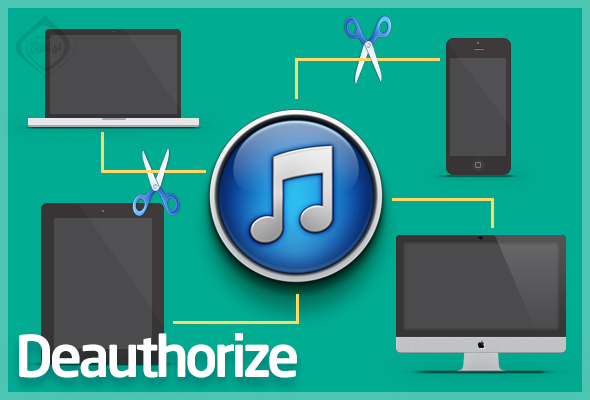
How to remove the authentic devices from your account?

When you buy a new computer or download a new copy of the system on your current computer, you are doing a “Authorize” documentation for your device in iTunes. This is useful for synchronizing the device without deleting the applications and its content, downloading applications from the computer without requiring a password, activating automatic downloading, and other things. Important advantages, but Apple limits this matter to 5 devices only, sometimes the number of registered devices reaches the maximum, then we are surprised after we buy a new device that it is not authenticated to sync it, so how can we remove the verified devices from the account? And also to know the phones registered in the account?
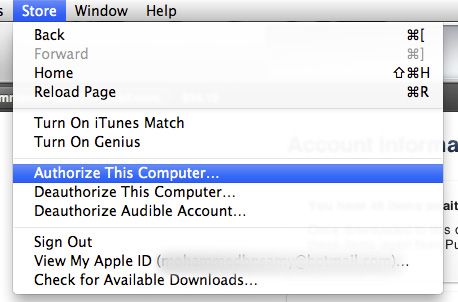
In the beginning, in order to "Authorize" the current device, go to iTunes and click "Store", then "Authorize This Computer". You can view a previous article via this link to know more.
To remove the authentication, click "Store", then "View My Apple iD" as follows:
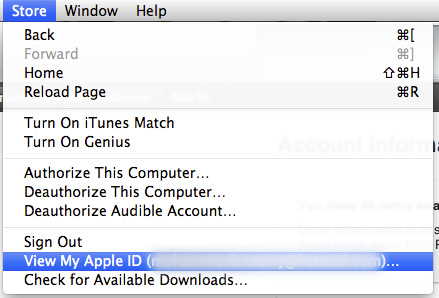
Type the password to confirm, and then your account data will be shown to you, including the number of currently documented devices. By clicking on “Deauthorize All”, you can remove all registered devices.
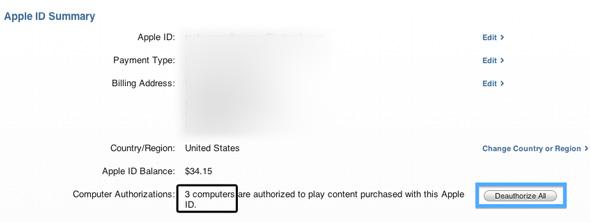
Note that the current computer you are using will still have the authentication removed. If you took the previous step, then you must authenticate the device as mentioned above.

On the same page, you can also find out the devices registered in your account that can download applications, purchase, etc., in the "iTunes & iCloud" option as follows:
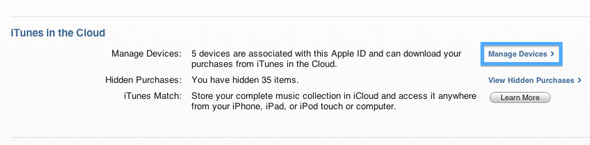
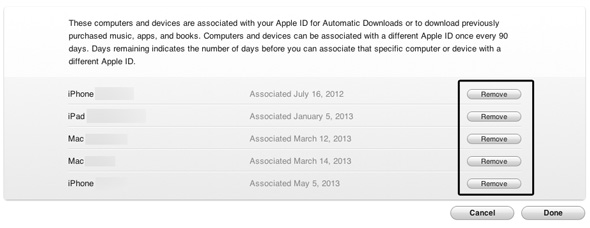
By clicking on the devices, iTunes will show you their names and when they log in to your account. You can also remove any of them by clicking on “Remove” and then “Save” that will appear instead of Done.
Did you suffer from the inability to authenticate your “Authorize” account for registering 5 devices previously? Do you have other problems with iTunes?

64 comment

comments user
Mohamed WanaS

If I buy a new iPhone, I can create a new account on it, and there is no doubt about it because it was owned by someone else
Who knows the answer, please be kindly asked to answer
Please advise you

comments user
Saleh Abu Bakr

I have a problem with the iPhone, I just want to do a factory reset, but the problem is asking me for the password. The password is asking me, but I forgot it.[email protected] I want to retrieve my password, but I don’t want just every phone. All the contents of this phone are with me. This problem is with me, and your safety is for you. Sincerely

comments user
khair omar

How can I cancel the account authorization, knowing that the computers associated with it are not owned by me or far from me

comments user
Dear

I want to delete devices on Google account

comments user
The Hazber

Peace and mercy of God
I worked software for the iPad, and when the settings and registering a new account, it gives the following message
This device is no longer eligible to create a free iCloud account
So what is the solution?

comments user
Turkish

Poonamj iPhone Islam
Show me this message
The maximum number of activated devices has been reached iPhone Islam

comments user
Alaa Al-Jubouri

Brother, this road does not work on version 11.1.3.2
Please help with the solution

comments user
show5e

I have a problem with the iPhone, the touch is broken, and I don't want to fix it because it's destroyed. I want to buy a second one, but I want to do a backup for it.
When I connect it to the computer, it asks me that I trust the device from the iPhone and I cannot unlock the iPhone

How do I create the option of seeking confidence ...?

comments user
mohammed

Guys, I forgot the iCloud account and locked the device, and I know that there is a solution to unlock it, but if the ID and the password are the right of the device that I did from the iCloud account, I can open my device ...

comments user
azzam

Please guys
I have a problem, I do not know a solution
All I am syncing to the Manzoo app is looking forward to the message
"The computer is no longer authorized for the items that were purchased."
Although they are authorized to authorize Authorize This Computer
I hope for a solution
Thank you very much

comments user
Sultan

I have a problem that I solved the documentation of my account on the iPhone side, and the problem is I sold the device
Abi solution is necessary because he refused to enter the account

comments user
Rabeh

Thank you very much, Yvonne Islam

comments user
Yaser

Indeed everyone has benefited from the program, but I have a problem, which program I open brings me another, and the programs are not free in the sense but requires you to update and extract data that ask you for the return

comments user
iHamza

Peace, mercy and blessings of God
We thank those in charge of the site, and may God bless you, to provide more for the support and efforts made
And special thanks to the author of the article

comments user
saad

How to install a program that converts the broken link a video, and you can refer to it without the net

comments user
Nawaf

Possible way to hide or delete programs from the “Purchased” box ... I will not have more than 20 programs that I need!

comments user
MOH

I have an iPhone 4S device and updated to the latest ios6 update. The problem is when I ask Siri to call someone and she replies to me, “I'm not permitted to do that for you” knowing that she was doing that, so what is the solution for that?

comments user
ms3soola

All that I do Restore for the iPod finds me that it has an unknown error, and I have to authorize the computer, knowing that I did such a thing and the computer is available What is between the devices for whom I open view my apple id and Restore * System file * I downloaded it from here * iPhone Islam * and put the device in the bucket mode ?? what is the solution ??

comments user
Mohammed

Peace be upon you. I give me 5 computers synchronization. Wait a year. Can you help me find a way to cancel it and synchronize with all devices

comments user
One of them

May God reward you all

For the fourth time, I put my question and I cannot find an answer. I hope you would kindly send the answer to the e-mail

ITunes is refusing to make a backup, I get a problem alert!
The last time I made a copy is XNUMX months ago
I hope the answer and help me with the solution
God does not forbid you to pay

comments user
Tenderness

May God Almighty help you
IPhone Islam Help me solve a problem
Unblock tweets protection for iPhone 4s
So that I can retweet my tweets knowing that they are (a prayer to God)
And my mail you have
Thank you for your cooperation

comments user
Saeed Murad

A very useful topic. We thank everyone for this explanation, and the inspiration is thankful

comments user
Saif Al-Janabi

Thanks for your creativity and long after

comments user
Hammoud

I have a problem updating the software and also downloading it. Please help me, Yvonne Islam

comments user
deyaa

And God is a wonderful information, and I am confused with it. A thousand thanks Yvonne Islam

comments user
Ibrahim El Sebaei

Does Iyad Mini 4G work with 3G network?

comments user
Ahmed Egitto

Get ready, men, and move forward to your goal. Good luck, God willing.

comments user
Maliki

How do I know the devices connected to my account from the iPhone

comments user
Bafqih

Creative brother Ben Sami :)

But in iTunes in the iCloud, I did not find the Manage Devices option. I only had Learn More .. What is the reason ??

comments user
Abdulsalam

Thank you Yvonne Islam

comments user
Iyad Arabi

I noticed in my hands that if I moved by gestures to the latest application and the gesture gesture, switching between applications takes me to the weather application who noticed it😄

comments user
ahmed abdullatif

A thousand thanks
I had a week looking for a way
You are very creative

comments user
Ezzaldine

I had five devices and I switched the format of the devices, and after that I could not enter iTunes because of a note saying that I have XNUMX devices, so what is the solution?

comments user
Abdulrahman

Very important and useful information, thank you Yvonne Islam

comments user
Abu Rital

To all members of Yvonne Islam
I have a problem and an elderly person who gave it a solution
Please help me
I tried to change my email address in iCloud
But what is useful
Cannot log in
The maximum number of free accounts has been activated on this iPhone
I hope the blog manager will solve my problem

comments user
Jawf is sweet

شكرا

comments user
hamode

Welcome to the beautiful information

comments user
Khaleelabo

Thank you very much. With this explanation, my problem was solved. A great effort. I was confident that Yvonne Islam will find the solution

comments user
Perseverance

A blogger who proved his failure after his last topic

comments user
Abu Muhammad

Hi
How can I change the safari settings, because I cannot access some sites

comments user
Abdullah Abu Haitham

Most of the jobs that we want to solve with Apple devices must pass through iTunes, and every job is Antar's story, long, complicated and slow. Wright, Apple cares and solves the iTunes complex.

comments user
Mr. Allam

After 5. computers and not. year, you can add another device by changing the current account from, for example, an Egyptian account to a Saudi or American account or vice versa, and thus you can synchronize the programs with the new computer.

    comments user
    Bafqih

    If you change the country of another account (Egyptian, for example) .. you must have applications from that (Egyptian) store and the previous store applications will not be synchronized.

comments user
Al Wasim

Sukhasaaaaaaaaa
IPhone Islam as such
👍

comments user
Abu Zaki

Thank you for all the information

comments user
Joking

Thank you for the awareness and guidance that you have provided to the Arab citizen

comments user
zizok93

Old information, but there is a way that you disable all devices even if a year has not passed and I used it before that

    comments user
    Normandy_tow

    Hi
    I have a simple problem, which is that I bought an iPhone, and when I register my account on icloud, a message appears that the device has more on it than what I am doing

    comments user
    Abu visions

    Information I benefited from: He who does not thank people does not thank God... Thank you.

    comments user
    Hadeel Awwad

    How can the authorization of all devices be canceled, even if a year has not passed

comments user
Mohammed

Peace be upon you .. Please help, because my problem has been for months and I have not found a solution for it anywhere
My problem is that after I buy the new iPad and do Autorization with iTunes, I cannot sync the programs. Unfortunately, when I sync, iTunes starts and writes sync, then after five seconds it does terminators and does not transfer the programs
Please help and thank you

    comments user
    Generous

    You must have apps that you sync with, not on your account or your account.
    Make sure the applications are one and the same

    comments user
    modycats

    I had the exact same problem with the iPhone XNUMX, and I could only find a solution to it with the following ..
    Sync the iPad with another computer and transfer all the programs to it as normal.
    Take a copy of the first iTunes programs for all the previous programs (from My Computer, My Documents, My Picture).
    Delete the iTunes you have completely uninstalled from the source.
    Download another iTunes from the Apple website and make a normal sync that you can find it works like a whole.
    Take a second copy of the programs that you had previously taken on a second device or a hard disk, and create paths for iTunes that you will find. I have downloaded and returned every thing like the first one, and it works perfectly ..
    Note: Always leave your laptop with enough space and the same for iPad (not less than XNUMX GB).
    And any service, uncle.

    comments user
    modycats

    I had the exact same problem with the iPhone XNUMX, and I could only find a solution to it with the following ..
    Sync the iPad with another computer and transfer all the programs to it as normal.
    Take a copy of the first iTunes programs for all the previous programs (from My Computer, My Documents, My Picture).
    Delete the iTunes you have completely uninstalled from the source.
    Download another iTunes from the Apple website and make a normal sync that you can find it works like a whole.
    Take a second copy of the programs that you had previously taken on a second device or a hard disk, and create paths for iTunes that you will find. I have downloaded and returned every thing like the first one, and it works perfectly ..
    Note: Always leave your laptop with enough space and the same for iPad (not less than XNUMX GB).
    And any service, uncle.

    comments user
    Moaz Al-Zahrani

    I had the same problem with me, and by rage, I found a solution.
    The solution in short is to authorize it from the iTunes options on your computer and everything will be synchronized, even the programs! 👍 🙂

comments user
ahada210

Thank you, the most important piece of information I used to know 😊

comments user
Nasser Al-Asmari

Thank you for iPhone Islam

comments user
And Woody

When do you view iPad again

comments user
Saleh

Information:
You can delete devices listed in your account every year, no more than once.

comments user
Husam

great information
thank you for your effort

comments user
Yousef

But how do we do this from the iPad?

    comments user
    Bafqih

    You cannot do these steps from iOS devices such as iPod, iPhone and iPad .. Only from a Mac or PC

    ITunes program works on computers only.

comments user
FaRi

Thank you, Yvonne Islam, for this wonderful information
I considered it a hindrance to me in syncing programs
I reached the highest limit, which is only five devices
But I finally found the solution
Thanks again

comments user
mahmoud rezq

Thank you Yvonne Aslam

Leave a response

We are not responsible for any misuse of the information mentioned above. IPhone Islam is neither affiliated nor represented by Apple. IPhone, Apple and any other product name, service names or logos referenced herein are trademarks or registered trademarks of Apple Computer.

العربية简体中文NederlandsEnglishFilipinoFrançaisDeutschΕλληνικάहिन्दीBahasa IndonesiaItaliano日本語한국어كوردی‎فارسیPolskiPortuguêsРусскийEspañolTürkçeУкраїнськаاردوTiếng Việt