The iMassage service is one of the best services that Apple provides to communicate between its devices, the service is considered according to the most secure and encrypted experts and is also available on the iPad, iPhone, iPod touch and even Apple computers and makes you send messages to it instead of the network and thus saves the cost of SMS, but this matter It causes a problem for some if you think about moving outside Apple phones, which is how to remove their number from the iMassage.
When you use the iMassage service for the first time, the system sends an international message from your phone to verify your number, and then Apple saves your number in its records, and if any other Apple user sends you a message on this number, Apple sends it via the iMessage service to provide it The cost of the SMS. So far, things are great and good until the user decides to exit Apple and use another phone.
A user buys an Android or Windows Phone phone, for example, and transfers the chip from the iPhone to his new phone, when his friends try to send him a message, the Apple system continues to send it through the iMessage - because his number is registered with Apple - so he does not receive any messages. This matter was causing a big problem for some, so that Apple devoted a page to explaining how to remove your number from iMessage, and there are two ways to solve this matter:
1
If you currently have an iPhone, add your device's chip to it, then go to settings, messages, and close the service. Apple will remove your number from it.
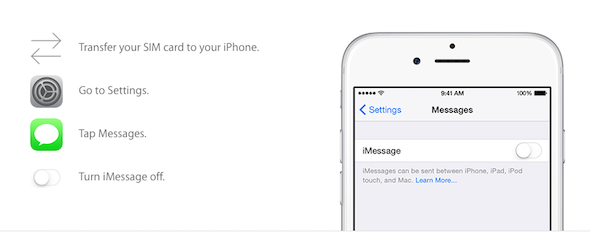
2
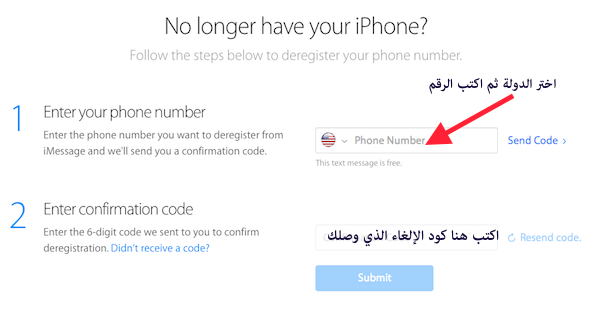
If you do not have an iPhone, visit the page designated by Apple for service through this link And write your number, then you will receive a text message containing a code, enter it on the Apple website, and your number will be deleted from the iMassage records.


42 comment