Finally, the update will be officially released, which will put the iOS system back on its right track after previous releases exhausted us. This version, which carries the number 11.1, comes with many fixes and improvements, and based on the experience of many developers, this version is much better than previous versions. Therefore, we recommend that you immediately upgrade to it.

Update features as mentioned by Apple
IOS.11.1 introduces over XNUMX new emojis, and includes improvements and bug fixes.
Emoji
◉ More than XNUMX emojis added, including new food types, animals, mythical creatures, clothing options, more expressive faces, distinctive characters and more.
Pictures
◉ Resolves an issue that could cause some photos to appear blurry
◉ Addresses an issue that may cause Live Photos to playback slowly
◉ Fixes an issue that could cause some photos to not display in the People album when restoring from an iCloud backup
◉ Fixes an issue that could affect performance when scrolling between screenshots
Accessibility for people with special needs
◉ Improves braille support for second-class input
◉ Improves VoiceOver access for multi-page PDF documents
◉ Improves VoiceOver rotor notifications alert actions
◉ Improves VoiceOver rotor action menu when removing an app from the app switcher
◉ Fixes an issue for some users for whom alternate keys did not appear when using VoiceOver with touch typing
◉ Fixes an issue that caused the VoiceOver rotor to always revert to the default action in the Mail app
◉ Fixes an issue that caused the VoiceOver rotor to not delete messages
Other improvements and fixes
◉ Re-support for accessing the app switcher by pressing the edge of the screen with 3D Touch
◉ Addresses an issue that caused Clear Mail notifications to reappear on the Lock screen
◉ Addresses an issue that prevented data transfer between managed applications in enterprise environments
◉ Addresses an issue with third-party GPS accessories that was causing location data to be inaccurate
◉ Addresses an issue that was causing settings for Heart Rate notifications to appear in the Apple Watch (XNUMXst generation) app
◉ Addresses an issue that caused app icons to not appear in notifications on the Apple Watch
To update your device, take the following steps ...
1
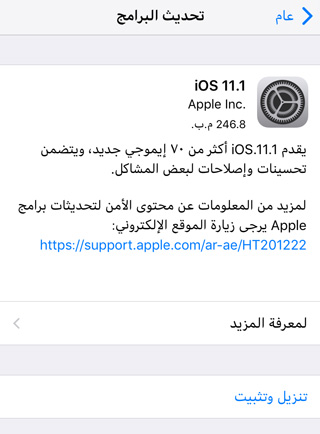
Go to Settings -> General -> Software Update, it will show you that there is an available update and its size.
2
You can click on Learn more to view the update details.
3
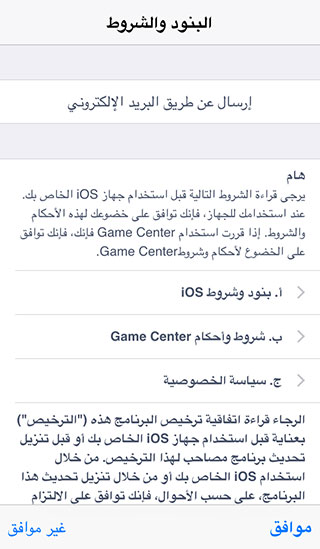
To download the update, you must connect to the Wi-Fi, and it is preferable to connect your device to the charger, then press the "Download and Install" button, and the terms and conditions will appear to you, then agree to them.
4
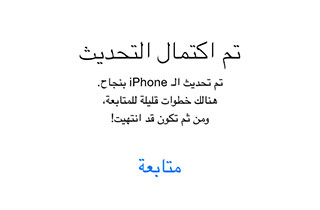
After the update is completed, the device will restart. After several steps, the update will be completed.


251 comment