Some people may delete WhatsApp messages by mistake or because of a problem on their phones, and this may be a serious concern because some messages may be important and may contain very important information, so the use of WhatsApp has become essential. Some people may not know that there are a number of solutions available that enable you to recover deleted messages, and the good news is that these messages can be recovered again and you will find that it is very easy to return them as if they were not deleted, you just need some time to learn the amazing solutions on how to recover deleted WhatsApp messages On iPhone and iPad in this article ...
1. Restore deleted messages from WhatsApp i-Cloud backup
One of the simplest ways to restore WhatsApp conversations is from the iCloud backup that WhatsApp makes ...
Step 1: Check if you have backups that work automatically by going to Settings> Chat> Chat Backup
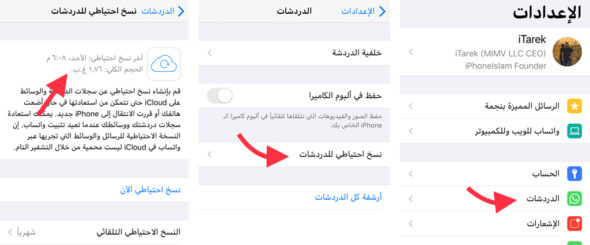
And make sure you have a backup copy, so if that's the case, go ahead ...
Step 2: Uninstall the WhatsApp application (yes, it must be completely deleted) and be sure to verify your phone number once you reinstall.
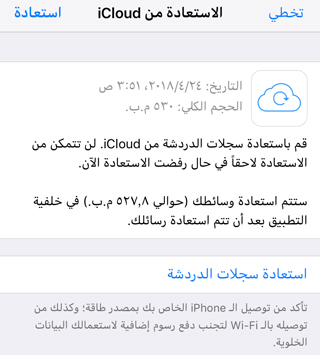
Step 3: Simply tap on Restore Chat History and it will recover deleted WhatsApp messages once the restoration process is finished.
The above-mentioned method may not be suitable for anyone who has a free iCloud account and its capacity is low, and therefore WhatsApp does not make automatic and periodic backups, but there are still other solutions using a program iMyfone D-Back Data Recovery for iPhone Which we talked about previously in more than one article.
2. Restore deleted WhatsApp messages without backup
If you don't backup your device to iTunes regularly or fail to restore the automatic backup to iCloud, you will need a standalone data recovery program, such as iMyFone D-Back iPhone Powerful tool To recover deleted WhatsApp messages effortlessly And also restore most of the lost data in your device, as recognized by many famous technical sites.
Program Advantages
● Recovers text messages, voice messages, photos and videos in WhatsApp conversations.
● Besides WhatsApp data recovery, it supports more than 20 other types of data, you can recover deleted Viber messages and recover deleted photos, text messages and notes on iPhone and iPad.
● It allows users to preview WhatsApp messages before recovery so that they can selectively recover the data they need.
Supports extracting WhatsApp from the iPhone itself or backups without replacing the current data on the iPhone.
Steps to recover deleted WhatsApp messages from iPhone using a program iMyFone D-Back
Step 1: Download and install iMyFone D-Back on your computer.

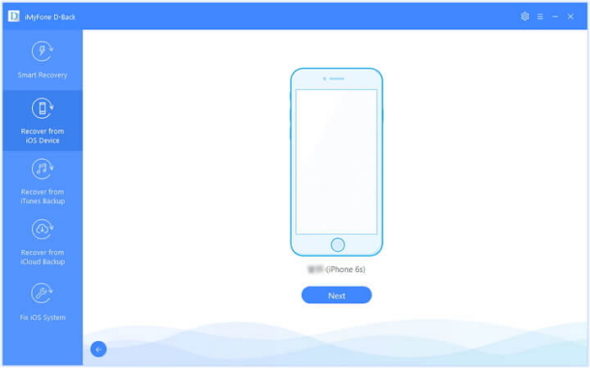
Step 2: Connect your device
If you choose to recover from iOS device, you may need to connect the iPhone device to the computer. Once recognized, you can click “Next” to continue.
Step 3: Select the file type and start scanning
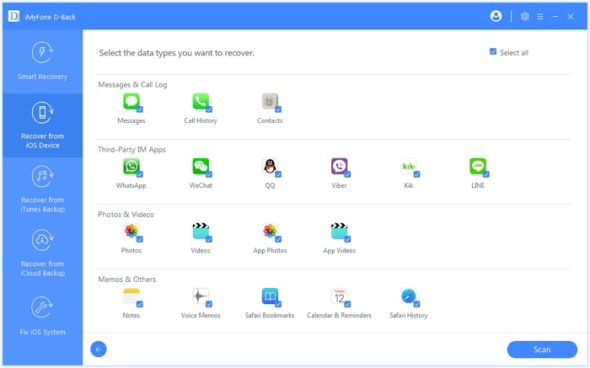
Choose the types of data you want to recover from the list of files. Here you need to choose "WhatsApp". Click "Erase" and then the program will start to scan your iPhone.
Step 4: Preview and recover deleted WhatsApp messages
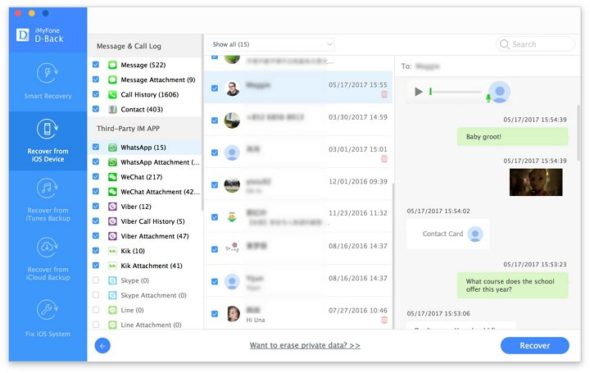
When the scan is finished, you can preview the data to find the exact WhatsApp messages you need. Then select the messages and click "Recover."
💡Noticeable:
The program restores WhatsApp messages from your device itself even after deleting them, but it is very important when you delete messages or any data, you stop using your device immediately and start the restoration process because the deleted files are subject to being overwritten again and thus are not recoverable.
IMyFone XNUMXth Anniversary

While writing this article, iMyFone published a special site for the company's fifth anniversary, and now offers many discounts on its programs, so you can take advantage of these offers now, which will last for a short time ...
Also, you can use this coupon to get additional offers and a discount of more than 82%, so that the price of the program is $ 14.98 instead of regular hair $ 69.95
M5Y7KJ



29 comment