How to turn off Wi-Fi automatically when you leave the house

The user always wants to keep his iPhone connected to the Wi-Fi while he is at home in order to reduce the consumption of cellular data while ensuring a fast internet connection, and it is often advised to turn off the Wi-Fi connection feature when leaving the house to avoid connecting to unsafe networks In addition to reducing the battery power drain that occurs as a result of the device continuing to search for available Wi-Fi networks and if you forget every time to turn off Wi-Fi or it seems boring for you to do it manually, here is an easy and simple way to help you lock Wi-Fi automatically when you leave the house The service will also restart automatically when you return home.
How to turn off Wi-Fi automatically when you leave the house


How to turn off Wi-Fi automatically when you leave the house

The Shortcuts application allows you to quickly accomplish various tasks, and one of these functions is the ability to program the iPhone to automatically turn off Wi-Fi when you leave the house, as follows:
shortcuts

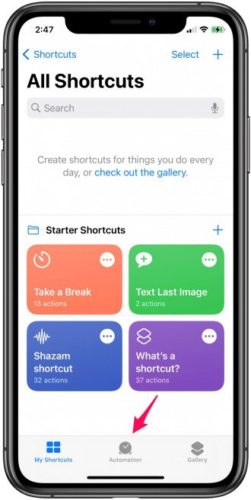
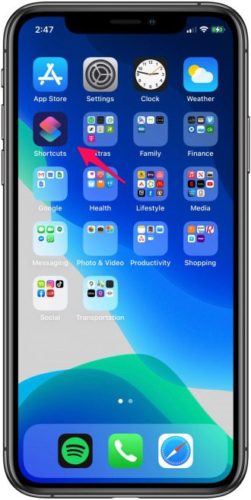
Open the Shortcuts app on the iPhone

shortcuts

Press Auto Control

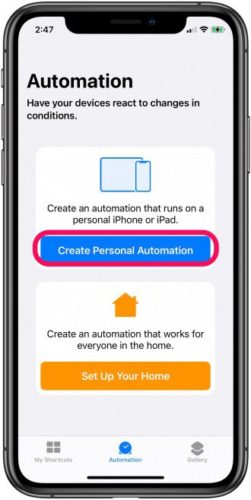
Select Create Personal Automation
shortcuts

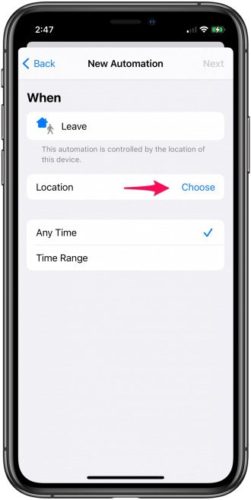
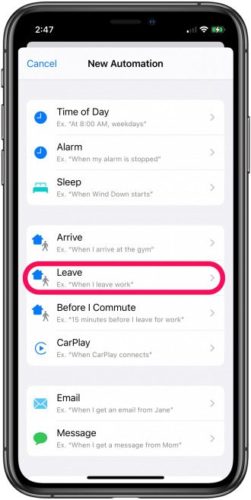
Click Leave

shortcuts

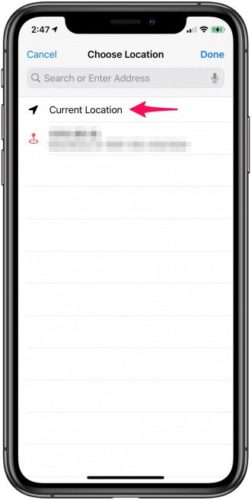
Then select an option next to the location
shortcuts

If you are doing it from home, select the current location and then Done
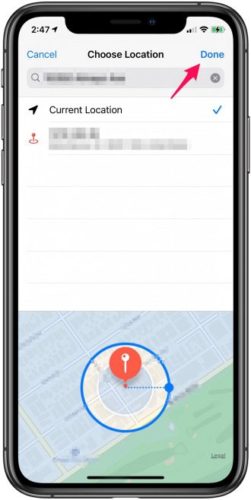
After that select Add Action and type Wi-Fi in the search bar
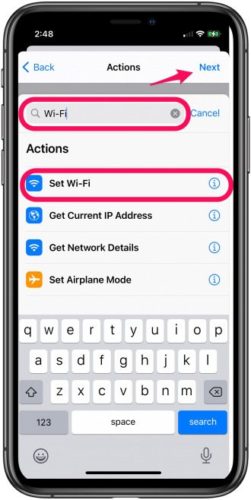
Choose Set Wi-Fi and click Next
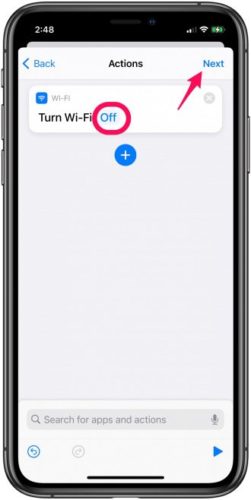
Press ON to turn it OFF
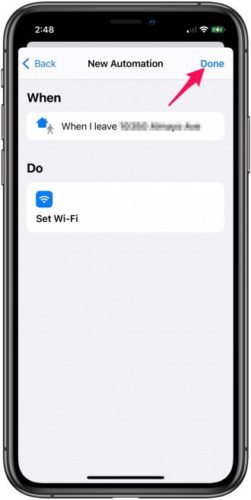
Then click Next and then Done


How to turn on Wi-Fi automatically when you arrive at home
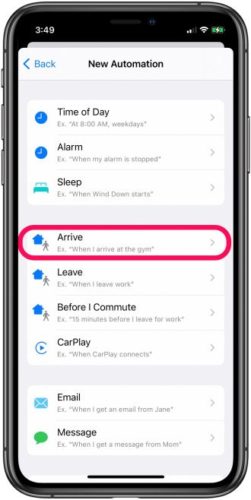
Just as shortcuts turn off Wi-Fi, they can easily restart the service as soon as you arrive home, and to carry out that task, you will take all the steps we mentioned above, but instead of choosing to leave, you will choose an access password.

Do you use shortcuts to do the things you want? Share your experience with us in the comments

Source:
apple

87 comment

comments user
fatima

Brother, thanks for the article, but I think you forgot something important, which is the fact that the phone will try to know your location all the time, and this will undoubtedly accelerate the battery running out more than the Wi-Fi.

comments user
Muhammad Al-Shaer

Wonderful article thanks very much

    comments user
    Blog administrator

    Always follow us for more great articles

comments user
Outstanding return

Very very cool
Like
Thank

comments user
Ismail

Peace, mercy and blessings of God
I tried the Wi-Fi shortcut and made the exact same steps, but unfortunately it does not close at the exit and does not open upon arrival at home ..
Please help if there is a solution
Thank you

comments user
Mohamed Faramawy

Same article It appeared on the Arab portal website
Is it a coincidence or stolen content, please clarify

    comments user
    Blog administrator

    Firstly, our article was published two days before the article that I mentioned, and the Arab portal site is a good site. We should not accuse it of theft, but as we previously told us, we put the source at the end of the article, and it is possible that it is also a quote from this source.
    No problem, the important thing is that the information reaches the people.

comments user
Muhammad Sukkar

May Allah reward you for all those in charge of the program

1
1
comments user
Muhammad Sukkar

May Allah reward you with good information and a very, very wonderful application

1
1
comments user
Tired Maliki

Very cool article
Wind me in many shortcuts I did not know

1
2
comments user
Ahmed Elghamrawy

How do I add these steps, especially since I did not find the automatic activation icon?

1
1
comments user
Ahmad A

Thanks

1
1
comments user
Abdul Mohsen Al Yafei

Hi

The aforementioned is not true. The article ..

As I look at the house, it gives me an alert, and of course it disconnects the Wi-Fi .. But when it arrived, I connected it to Wi-Fi always.

comments user
Abdulrahman

The GPS is on, but it just gives me an alert. I go to the alarm, turn on Wi-Fi, and so on

comments user
Abdulrahman

Peace, mercy and blessings of God
I tried the Wi-Fi shortcut and made the exact same steps, but unfortunately it does not close at the exit and does not open when arriving at home .. What is the reason, brother
1 

comments user
Abdulrahman

The wifi only gives me an alert to turn it on if I get home, why not?

comments user
Abdulrahman

Hi

comments user
Ahmed

N the best and sweetest shortcuts

comments user
Mohammed

Thank you for explaining these useful methods
May Allah reward you all the best

comments user
Ahmed Shaheen

Peace, mercy and blessings of God
I tried the Wi-Fi shortcut and made the exact same steps, but unfortunately it does not close at the exit and does not open when arriving at home .. What is the reason, brother

    comments user
    mohamed refai

    You may be a Gps lock that needs to be unlocked in order to locate the home

comments user
Khalid Al Hajri

One of the most abbreviations that will help me 😍❤️
thank you

Is it possible to activate cellular data with the same shortcut to WIFI and is not allowed ?!

comments user
abu ahmed

My teacher, is there an app to cut Wi-Fi from some apps on the iPhone?

comments user
Umm Fahd Al-Omari

May God reward you with the best reward for your useful topics

comments user
Men Agle Zalek

One of the best and greatest applications in all devices and all systems
Greetings to the workers of iPhone Islam for showing these advantages in this application for those who do not know ,, and we want more uses of the application because this application is an invention from Apple, but many of us do not know those things

comments user
Islam Bounef

Brother, thanks for the article, but I think you forgot something important, which is the fact that the phone will try to know your location all the time, and this will undoubtedly accelerate the battery running out more than the Wi-Fi.

3
1
comments user
Ashraf

This is my first time using it 😂😍😍

comments user
Ali Albibi

Thank
Activated

comments user
nawaf

May God give you wellness

1
1
comments user
Mohammed Jassim

The problem is any shortcut in accessing the site that is not accurate in ordering! It may work yet, it may work before, and it may not work at all, especially when due to the shortcut inside the house, there may be obstacles when determining the location!

comments user
Forwards

Well, by God, the explanation is very good, and I have been searching for this feature for some time, thank you

1
1
comments user
Sage

Excellent. It opened the door for many other processes that can be done through this application in an easy and simple way.

شكرا لكم

2
1
comments user
Abdullah

Use the personal auto control "When opening the application" and set the actions you want to take

How is this dear
So I tried several times
I wish his book or section of the procedures
And the steps exactly thank you

comments user
Wael Sobih

not

comments user
immortal

I mean, you solved the Wi-Fi problem because of the battery, and you gave the user a bigger problem and more battery consumption due to the GPS operation!

The method is fine but keeping the GPS on all the time makes me never consider using it

3
2
comments user
Islam

رائع

comments user
Yahya Abu Hamad Al-Wahaibi

Good luck reward you

comments user
Mohamed

By opening the application, searches for automatic control is not present

comments user
Hamad 😇

ت

comments user
I'm sorry

Excellent and God bless you iPhone Islam

comments user
Amer Nayef

I tried the method and worked fine. I do not know where the defect is. Please detail it, something is missing .. Thank you, Yvonne Islam

comments user
Mustafa Smsm84

👏🏻👏🏻👏🏻👏🏻👏🏻

comments user
Amer Nayef

There is another problem if I get on the boat, it gives me to change I know what the destination is

comments user
Amer Nayef

This is what I have been looking for for a long time and I have not known to control it, but in return, like what the Brotherhood said, the site will drain the battery. Thank you, Yvonne Islam for all of the above.

3
1
comments user
Yusuf Ahmed

Excellent 👌🏻

comments user
Mohammed

I wish the explanation and the pictures in Arabic are pride and pride in our language

7
4
comments user
Salman Al-Jumairi

Creativity explanation is very useful, may God reward you well

comments user
Sami Manoukian

God bless you

comments user
Mohammed

Thank you very much

comments user
Radwan Faour

But in return it will increase the energy consumption because in this case the location feature must remain activated and it consumes more energy than searching for the network

8
1
comments user
Joe john

May Allah reward you

comments user
Ehab Refaat

But there is a problem when you run vpn and disconnect the Wi-Fi

comments user
Basem

Of course, the method is very practical, but it has a big flaw, which is that every time the shortcut is executed, when the condition is met, an alert appears that must be pressed in order to implement the shortcut, which is what I lose the shortcut. The mechanism of action. I don’t know why Apple puts this condition and the shortcut loses its strength. Although some commands allow you to execute them automatically without interference from you, such as the shortcuts related to CarPlay are executed automatically without your interference.
Brotherhood in Yvonne Islam, is there a way to overcome this obstacle? Thank you

16
1
    comments user
    UnlimitedLine

    True, a very strong feature, but I canceled it because I needed to intervene, even though I could enter the control center and switch it off

comments user
Adnan

God bless you

comments user
ALHARBI

Nice move, but you have settled the same procedures and do not close with me. I expect I must do something about privacy> site service> system services, and I know and Shuh because I have locked some options. Can you clarify which option needs to be active to take advantage of the feature

comments user
Wael Soliman

Very excellent and thank you very much
A topic that was really very tiring for me and this solution is genius, and we hope more of you, God willing

comments user
Basem

I hope that the shortcut will be shared among followers to benefit from the experiences
Personally, I designed several shortcuts, for example, a shortcut to lock data usage when connected to the home network, in order to save battery
The idea of ​​the shortcut is almost the same, but instead of using the checkout and access, we use connect to wifi and define the home network, in the case of disconnect, we add cellular data on, and in the case of connect, we add cellular data off.
This way, we ensure that the data network is turned off when you connect to wifi, and vice versa
I hope you try it and notice the difference on the battery, of course you notice if you are sitting at home for long periods of time

16
comments user
Abu Muhammad Al-Dossary

I mean, I have to turn on the GPS !!
As well as you did not benefit because the battery consumes more

1
2
comments user
Ahmed Al Farhan

A sweet idea to try and see

comments user
Abdallah

God gives you a thousand wellness, and God gives you a neat, adequate and sufficient explanation

comments user
Mohamed Soliman

How we wished you to have the explanations pictures in Arabic, and you promised us that, and we are still waiting to be able to benefit from these valuable explanations that you prepare.

4
1
comments user
Abdulkareem Attuwaijeri

excellent. I took advantage of it and activated the shortcut, and I was using shortcuts to give a warning when disconnecting the charger

comments user
mahmoud

Frankly, I do not understand the shortcuts program, and I do not know how to use it except through what you do from articles to how to benefit from it

comments user
Ziad Khalil

I want articles on the shortcut \ automation program

comments user
Abdullah Jaber

Useful .. The explanation is clear phrase and picture

comments user
Ziad Khalil

Wonderful article

comments user
Safaa Kaysi

Thanks Done

comments user
I love you so much

Thank you, dear brother

comments user
Miqdad

شكرا لكم
I think a shortcut to turn off cellular data and activate Wi-Fi when entering home is better

7
1
    comments user
    ash

    It can be done in the same manner mentioned in the article with changing procedures

comments user
Mootje Mo

Subject to the level, and at the appropriate time that I was looking for I would love for you to multiply such shortcuts that are useful to us in our daily life Thank you for all these efforts, and the experiment was completed successfully, continue

comments user
Abdullah

Kindly
Required when opening Google Maps, the location services will be activated directly.

    comments user
    ash

    Use the personal auto control "When opening the application" and set the actions you want to take

comments user
Abdullah

May God reward you with the best explanation, full and clear 👍

2
1
comments user
Ahmad

May God grant you well-being, very, very beautiful, thank you very much

comments user
Ahmed Mohamed Eldeep

The goal is to reduce battery consumption because the device prefers to always search for networks in the background

Should I run location services in the background, it will affect the battery
And I think its effect is greater than that of searching for networks

6
1
comments user
Ahmad Jalal

This way, the battery will be depleted to know your location all the time to activate it.

6
1
comments user
Hussain Bassem

I learned it myself very useful but I think it drains the battery

4
2
comments user
taxi

How are you, Tariq Mansour, I want information about iPhone 12

comments user
Karem Mahmoud

God bless you
very helpful

2
2
comments user
Nashid Al Rekabi

The best of people is the benefit of people

5
3
comments user
Abdul Hamid Iraqi

Thank you very much for the information De Mounjed I needed

3
1
comments user
ayman

Very useful, I am the first time to use shortcuts

comments user
Abdulrahman

ممتاز

comments user
Muhammad Al-Shaer

very helpful

comments user
Badr

Well done, dear brother Walid, really a beautiful and useful movement 👍

5
1

Leave a response

We are not responsible for any misuse of the information mentioned above. IPhone Islam is neither affiliated nor represented by Apple. IPhone, Apple and any other product name, service names or logos referenced herein are trademarks or registered trademarks of Apple Computer.

العربية简体中文NederlandsEnglishFilipinoFrançaisDeutschΕλληνικάहिन्दीBahasa IndonesiaItaliano日本語한국어كوردی‎فارسیPolskiPortuguêsРусскийEspañolTürkçeУкраїнськаاردوTiếng Việt