Beware.. VPN apps for iPhone contain deadly poison

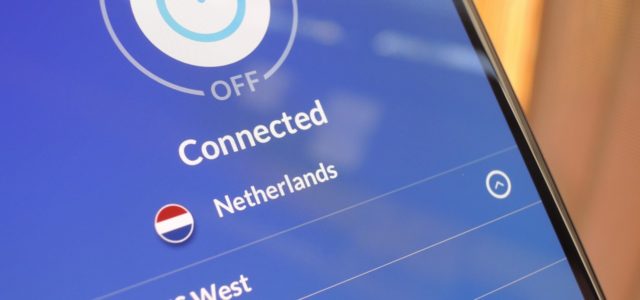
Many of us rely on VPNs to protect privacy, make our communications secure, and also prevent any attempt to track you and see what you're doing on the web. Camel It is not as we imagine, and some data has been leaked, although the main purpose is to protect our data and prevent our identity and location from being recognized, and the worst is that Apple knows this problem and has not solved it yet.

Scams Pretending to Be From Your Company


VPN apps

The story began when a security researcher posted on his blog a constantly updated topic about VPNs on the iPhone and pointed out that they do not provide protection and are just fraudulent applications, and added that these types of applications leak user data and Apple has knowledge of the matter, but turns a blind eye to it. .

Security researcher Michael Horowitz claims he was able to ensure that VPN apps and service providers were able to leak user data and tested it on several such apps on an iPhone running iOS 15.6.


How is data leaked?
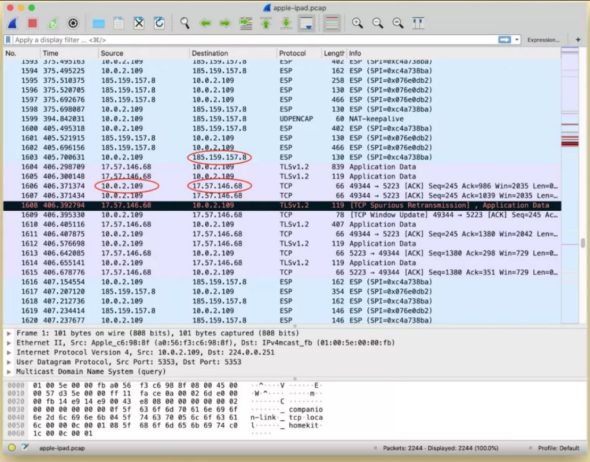
A VPN should establish a secure, encrypted connection between your device and the Internet through a tunnel or private network through which your data and communications can travel. However, Horowitz clarifies that all sessions and connections established before activating and using the VPN app must be terminated and this does not happen by default, which means that user data can still be accessed outside the VPN range.

Horowitz also investigated further to see if any iPhone VPN service providers had implemented an option called Kill TCP Sockets after connection that would automatically shut down those connections, and after reviewing some VPN services, Horowitz found that these apps do not provide an option to terminate connections that were established before using VPN services.


What about Apple
Horowitz sees VPNs as being relied upon by the user because they want to secure and protect their data and prevent access to it. VPN applications may try to protect the data but fail to do their job. It was found that the issue affects services like ProtonVPN, WireGuard, Windscribe, and others. Which indicates that the vulnerability lies in the iPhone operating system itself.

The security researcher explained that Apple is aware of the matter but has not addressed the issue despite the fact that it had been two years since it was first introduced and that was in March 2020. When the service reported ProtonVPN that details of what appears to be the same error were found. The data of VPN users who used an iPhone running iOS 13 and iOS 14 were leaked.


What is the solution?
One solution is to use Apple's Always On VPN feature, which allows you to have complete control over your traffic. It ensures that the VPN's encryption tunnel is always active so all your communications are protected. However, the process of enabling this feature is complicated and not many users can do it.

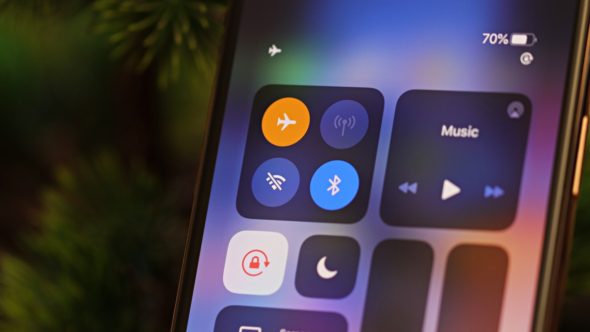
ProtonVPN suggested turning on Airplane Mode after activating the VPN to shut down all connections to the device, pause the VPN, and then turn off Airplane Mode. This will restart the VPN again thus eliminating any previous connections. Your connection is fully encrypted, however Airplane Mode may not stop 100% of previous connections.

Ultimately, Horowitz advises not to trust any VPN service provider on iPhones. Instead, he thinks it's best to use a VPN from your router to protect your entire network. Thus, all devices connected to the network are secured and protected. Including your iPhone and in this way all your past and current communications will be encrypted.

Do you use a VPN app on your iPhone, tell us in the comments

Source:

macworld

26 comment

comments user
Hamid Nazal

Has the problem been resolved by Apple now or not?

    comments user
    MIMV. AI

    Hello Hamed Nazzal 🙋‍♂️, Until now, Apple has not solved the problem related to data leakage through VPN applications. But we always recommend updating to the latest version of iOS, as there may be important security updates. Don't forget to stay away from suspicious applications and check the source of the application before installing it! 😊📱💻🔒

comments user
nawaf

Thanks for the great article 🌹

comments user
[email protected]

There are no Arabic websites that offer a comparison between VPN application programs for awareness.. Only non-Arabic websites offer tables comparing reliability tests on an ongoing basis

comments user
Abdulaziz Al-Raisi

Yes use 1.1.1

comments user
salah abderrahmane

Use a vpn from Kaspersky, is it also unsafe?

    comments user
    Airmon

    Kaspersky is one of the best antivirus and spyware protection companies. It is assumed that the VPN is safe and more secure, because all the data will pass through their servers.

comments user
Forgive

I use
"DNSCloak"
I think it is safe. Any confirmation?

    comments user
    Airmon

    dnscloak
    This is what a VPN is, an encryption tunnel whose function is to create an internal VPN connection only, and through it you can filter what you want from ads and other things, but it does not protect privacy and does not change the IP in the first place.

comments user
Abdullah Salahuddin

Frankly, I recommend Windscribe to everyone who has subscribed for XNUMX years, and the protection is very high

comments user
Mohammed Hilmi

The VPN app is not working on the iPhone, according to Apple

comments user
m

I expect the article.. about free vpn applications.. what is the content of it

comments user
Djamal Yacine

Useful information Thank you

comments user
Faisl Alrsheed

May Allah reward you for our beautiful website, Phone Islam, for providing us with such good and useful information.

comments user
Mofleh

Thank you for this creative article. Important and strange information. Apple has not addressed this simple problem. Use VPN applications on the iPhone, especially Proton, and also use TOR sometimes if you are searching for sensitive information.

1
1
comments user
Zahran

Excellent, we understand the topic of entering the VPN in the router settings, but what username and password do I enter??

    comments user
    iSalah 

    Subscribe to the VPN service and they will give you a username and password. Put them in the VPN settings inside the router settings, then restart the router. In this way, the VPN will work as long as the router is working, unless the VPN subscription package has run out, depending on your subscription type, a specific package or an open package for a specific monthly amount.

comments user
iSalah 

Dear friends, the method for running VPN on the router is easy and does not require instruction or explanation. All the user does is enter the router settings, then the VPN settings, enter the username and password, and that’s it.

4
1
    comments user
    Mofleh

    Recommend us an excellent VPN service to subscribe

comments user
Alihassan

Please explain how to run a vpn through a router. Thank you

2
1
comments user
Ibrahim Hassan

Please answer the previous questions with explanation

comments user
Tammam

Please, how to run a vpn through the router in a new article

15
comments user
Faisal Al Qasimi

Hi
How can the VPN run through the router?

    comments user
    iSalah 

    Peace be upon you and God's mercy and blessings, every router has settings, go to the settings on the router and search for the VPN settings and enter your account information and the password for the VPN and make a connection, it may, depending on the type of router, disconnect from the Internet and reconnect to activate the connection to the VPN service and that's it, it's easy and doesn't require anything, and if you don't know, find a computer technician to do it for you

    7
    1
    comments user
    Tamim

    The process is simple, but you need to go and subscribe to the VPN service and get the login information and the type of protocol, then enter the router settings in the way everyone knows 192.168.1.1 or 192.168.0.1 and go to the VPN option and add the data and the device router.

    3
    1
    comments user
    Forgive

    We hope a special article from Von Islam on this subject!

Leave a response

We are not responsible for any misuse of the information mentioned above. IPhone Islam is neither affiliated nor represented by Apple. IPhone, Apple and any other product name, service names or logos referenced herein are trademarks or registered trademarks of Apple Computer.

العربية简体中文NederlandsEnglishFilipinoFrançaisDeutschΕλληνικάहिन्दीBahasa IndonesiaItaliano日本語한국어كوردی‎فارسیPolskiPortuguêsРусскийEspañolTürkçeУкраїнськаاردوTiếng Việt