Apple released an update iOS 16.2, and includes a large package of changes, improvements, and new features, including a completely new app, new additions to live activities, better control over Siri, a significant improvement in the Shortcuts application, significant changes in Safari, music, and much more, until it counted 38 among the features And improvements in the iOS 16.2 update, in this article we learn about the most important ones.
Freeform or the new free space app
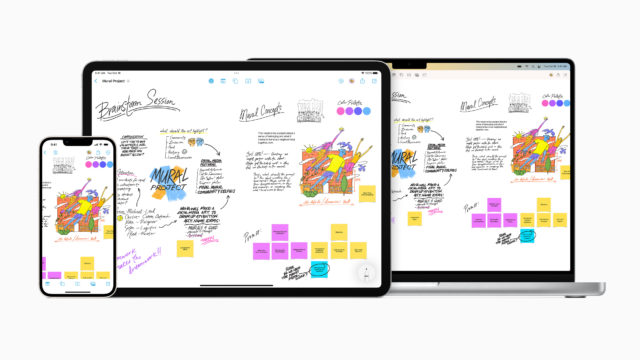
The application was announced at the Apple World Conference for Developers in the previous June, and it is a digital whiteboard that you can draw and write on, insert media, attach documents or notes, as well as stickers, add comments, and engineering drawings that can be automatically adjusted, and the most important thing that distinguishes the application is that it is interactive and collaborative where you can Involve your friends to share ideas in real time through FaceTime or iMessage.


iCloud Advanced Data Protection
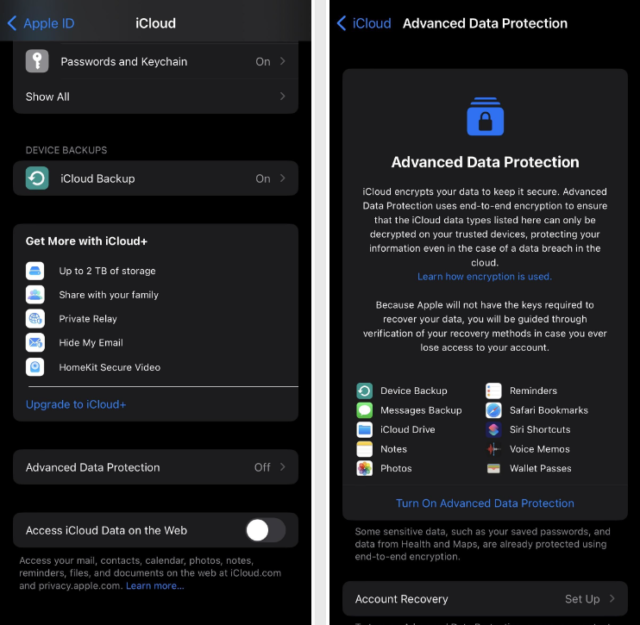
Not everything that syncs on iCloud is end-to-end encrypted. Prior to the iOS 16.2 update, only 14 categories of data used end-to-end encryption. When you enable the new Advanced Data Protection feature in iOS 16.2 through iCloud settings, Apple Increased the number of encryption to 23, including: Backup, all iCloud Drive files, photos, notes, reminders, Safari bookmarks, Siri Shortcuts, Voice Memos, Wallet, Passwords & Keychain, Health data, Home data, Messages in iCloud, payment information, Apple Card transactions, Maps, keyboard-learned vocabulary, Safari including history and grouped tabs, Screen Time, Siri information including Siri settings, Siri customization, and sample “Hey Siri” requests, Wi-Fi passwords, Bluetooth and Memoji.
End-to-end encryption protects your information even if an iCloud data breach occurs.
As Apple states on its support page, "end-to-end encrypted data can only be decrypted on your trusted devices that you're signed in with your Apple ID."
The Advanced Data Protection feature is available to US users and will be rolled out in early 2023. We only recommend activating it for those who are really interested in having their data encrypted in such a strong way.
Pointers for participants in the notes
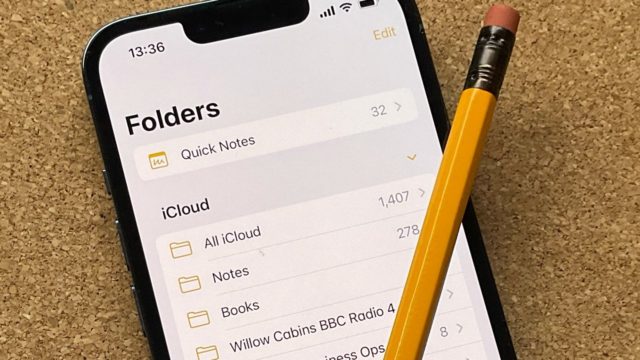
Apple significantly improved collaboration in the Notes app in iOS 16, and iOS 16.2 includes something extra, like participant pointers. When you're in a shared note, you can see live indicators while others make updates to the document.
Improved image search in messages
iOS 16 has improved the Spotlight search feature on the Home screen or the Lock screen and images from messages, notes, and files, not just the Photos app, are shown when you search for specific content in Photos, such as specific text, cats, books, etc.
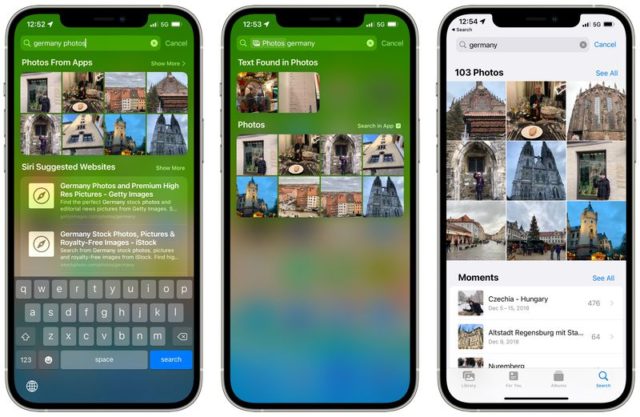
It's good that Spotlight search is now a better search tool for the Messages app than the search tool built into Messages itself, and the iOS 16.2 update fixes that, so you can search by keyword in the Messages app to find images in your conversations more easily.
Fewer swipes for all notifications
It is known that there are three different notification views, count, stack and list. For alerts on the lock screen and in the notification center, whichever you choose, you have to swipe up on the screen between once and three times to see your oldest notifications. And if you swipe down from the home screen or within an app, you'll see new and old notifications right away.
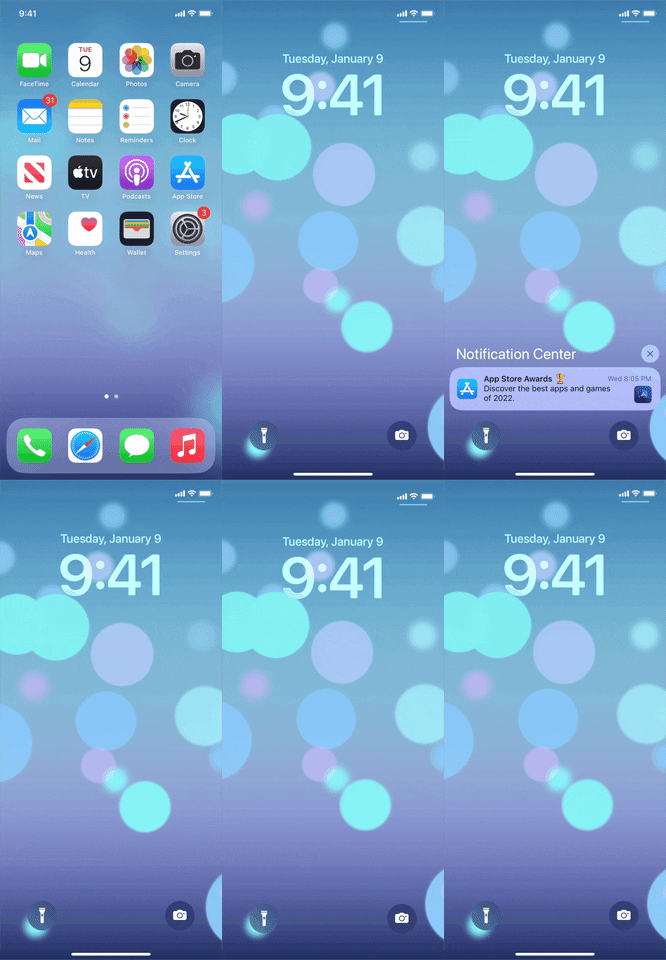
Now in iOS 16.2, when you swipe down in the Notification Center, no matter what display you choose, you'll always see the old notifications along with the new ones. You still have to swipe up on the lock screen to view older notifications, too.
More options for Always On Display
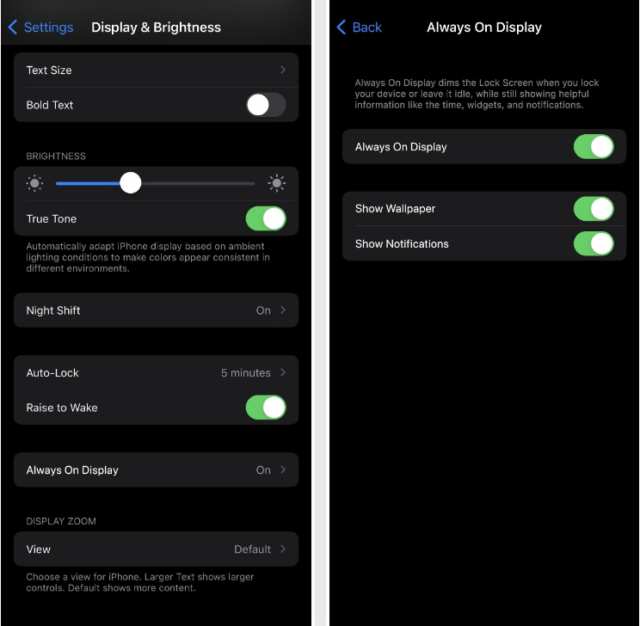
The iOS 16.2 update includes controls to hide the lock screen background and notifications, and you'll see the time and widget, but with a completely black background. To change to the new settings, go to Settings  -> Screen and Brightness -> Then the Always On Display feature.
Siri's spoken response preference is back
In iOS 16.0 and 16.1, the only options available for Siri's spoken responses were "Automatic Responses" and "Prefer Spoken Responses."
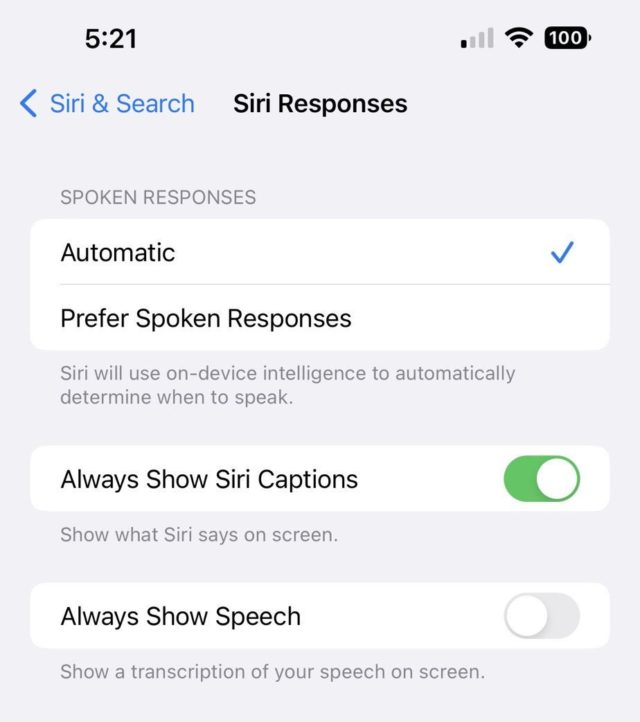
Where the automatic option Automatic using intelligence on the iPhone to determine when you should talk to Siri and when you should not. While the Prefer Spoken Responses option tells Siri to always speak out loud, even with silent mode enabled.
But in previous versions of iOS updates, it contained a third option, which is “Prefer silent responses,” and this makes Siri silent almost all the time.
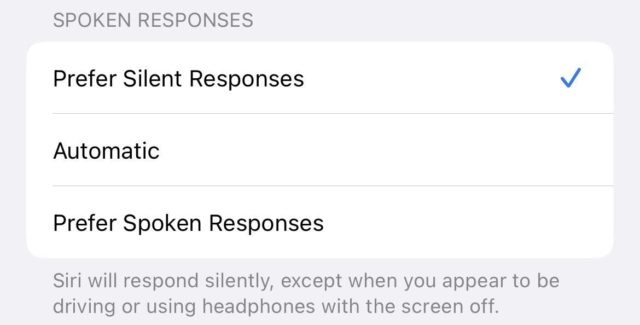
Now this option is back in iOS 16.2 update. You can activate it through settings -> Siri & Search -> Siri Responses Siri will respond silently with this option enabled, “except when it appears that you are driving or using AirPods when the screen is off.”
Live activities in Spotlight search
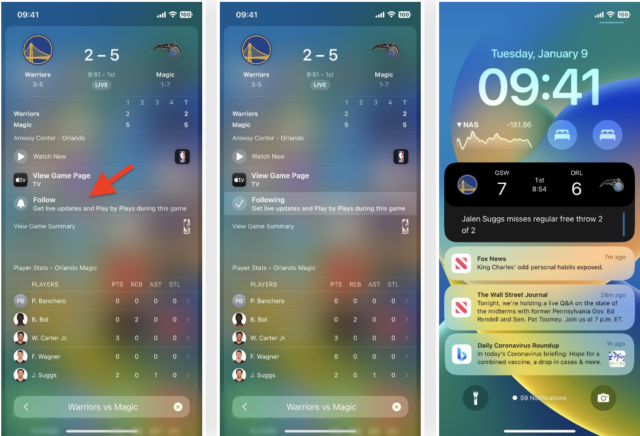
iOS 16.2 brings more functionality to Live Activities by allowing them to be launched directly from Spotlight search. For example, if you want live updates for a sports game, you can search for a team, click on the result, and then choose Follow.
Third-party apps can build this integration into their live activities, but it's now limited to some countries and some sports.
Feature more frequent updates of live activities
Prior to iOS 16.2 when opening an app through Settings You will find that you can activate or disable the Live Activities feature from the same page, and there are no other settings for it. look at the picture:
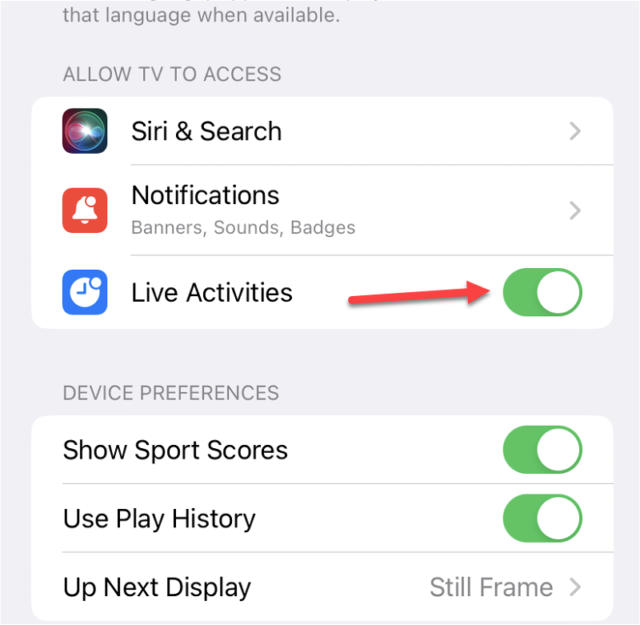
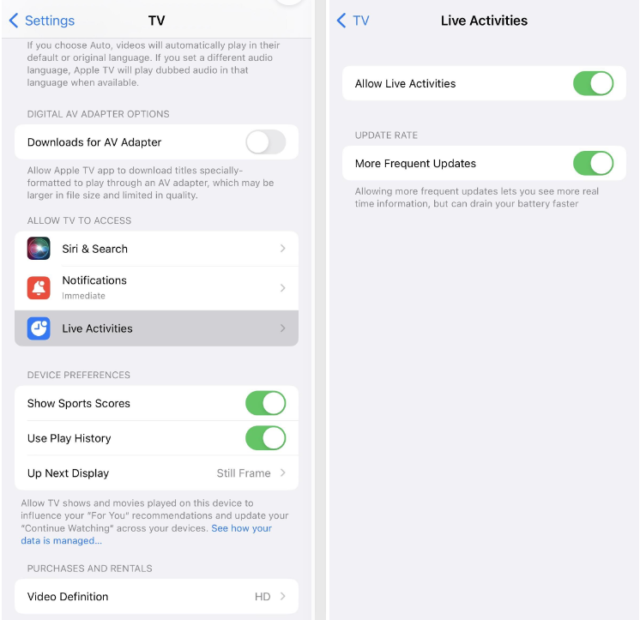
But what is new in the iOS 16.2 update is that there is a new page for live activities, which includes the option to enable or disable them, and a new option “More Frequent Updates”, this option is visible in the TV application, and it may also appear in third-party applications, and this new option allows to see More live activity information in real time, but it may drain the battery as Apple says, see image:
Sleep widget on lock screen
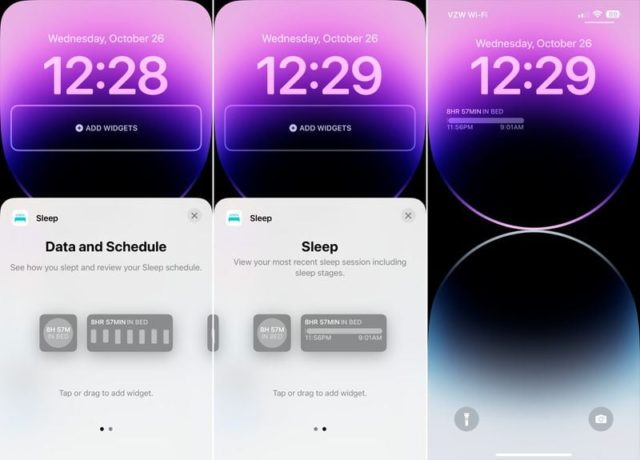
The sleep widget contains data and a schedule, related to how you sleep and review your sleep schedule. It contains “Sleep”, where the last sleep session is displayed, including the stages of sleep. A third option has been added that is just a shortcut to the Sleep section of the Health app.
Health widget on lock screen
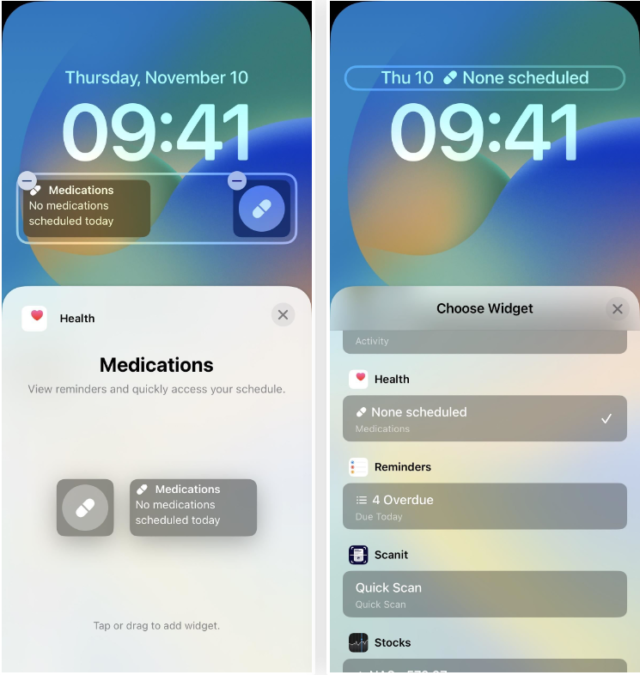
The iOS 16.2 update adds a health widget to the lock screen that contains a section to remind you of when to take your medication, and another section to list your medications that you registered in the Health app.
The features and improvements of the iOS 16.2 update have not ended, and we will mention the most important ones in another article.




20 comment