You can change Siri's name to a new name in iOS 18

Apple added in IOS 18 update A new accessibility feature called “Voice Shortcuts.” Users who installed the beta version of the iOS 18 update discovered that this feature allows you to change Siri’s name. Instead of saying “Hey Siri,” you can now say any word other than it. Learn about it.
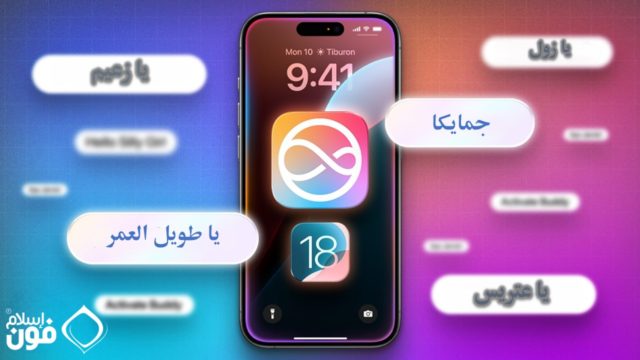
From iPhoneIslam.com, A smartphone screen displays a colorful app icon in the middle, the time 9:41 and the date Monday 10. Arabic text phrases appear around the screen on a gradient background, highlighting iOS 18 features and Siri name change.


Voice shortcuts in iOS 18

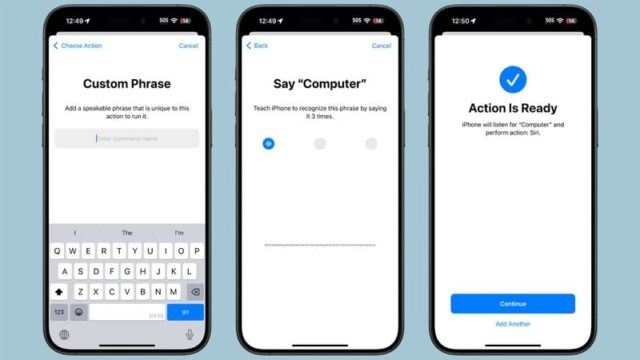
From iPhoneIslam.com, Three smartphone screens showing setup for a custom voice command in iOS 18: Enter phrase, Repeat phrase, and Confirm action. This could revolutionize how you interact with your device, much like changing Siri's name.

The Voice Shortcuts feature allows iPhone and iPad users to set “custom utterances” that Siri can understand in order to launch shortcuts and accomplish complex tasks. One of the shortcuts you can set up is an alternative to “Hey Siri.” To set up a voice shortcut for Siri:

◉ Open Settings, then go to the Accessibility section.

◉ Then scroll down to Vocal Shortcuts.

◉ Then choose “Set Up Vocal Shortcuts.”

◉ Then select “Siri‌” and not “Siri Request.”

◉ Then write the new name that you want to use to activate Siri, such as “Oh my cat,” “Oh Captain,” “Oh my colleague,” “Oh Zul,” “Oh Pride of the Arabs,” or anything you like to call her with.

◉ Once you set the new name, you can say it to activate Siri. This is limited to the iPhone only, and cannot be synced with other devices such as the HomePod, so you will still need to use “Hey Siri” for those devices.
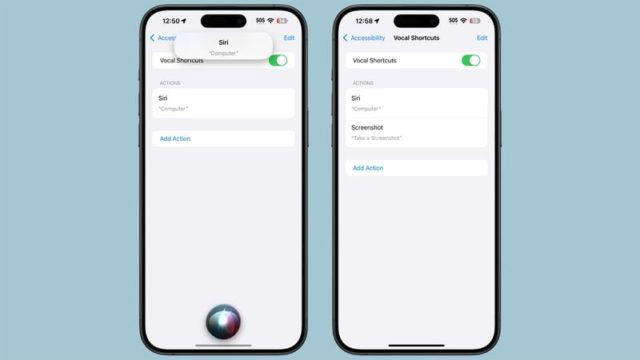
From iPhoneIslam.com, two smartphones show the screen for setting up voice shortcuts in Accessibility settings, one showing the Siri command and the other showing the Screenshot command. With iOS 18, you can also change Siri's name to further personalize your experience.


But!

As noted on Reddit, if you set up this shortcut, you'll need to pause after just saying the name to wait for it to activate before giving the command. With virtual Siri, you can say an entire phrase like, “Hey Siri, what time is it?” non stop. But this does not work with audio shortcut. You will need to say the wake word, pause for a moment, and then give the command after the wake word has activated Siri.

Because of this delay, most people are unlikely to be satisfied with it, and may not use it regularly.

The good thing is, you can still activate Siri with the phrase “Hey Siri” in addition to the new shortcut you set up.

Voice Shortcuts can be used to assign a voice command to launch any shortcut, as well as set up triggers for apps and system features like taking a screenshot, changing the volume, scrolling, activating Control Center, and more.

Voice shortcuts can be set up with another voice instead of speech, and this may be a useful option aimed at helping people of determination, or those who need alternative ways to activate system features.

What do you think of the voice shortcuts and Siri name change feature? What is the name of the new Siri that you gave her? Tell us in the comments.

Source:

macrumors

28 comment

comments user
zedan

I can't change Siri's name how do I change it?

    comments user
    MIMV. AI

    Hi Zidane 🙋‍♂️, I apologize if this is a bit confusing. To change Siri's name, you can follow these steps:
    1. Open Settings
    2. Go to the Accessibility section.
    3. Scroll down to “Voice Shortcuts”
    4. Then choose “Set up voice shortcuts”
    5. Select “Siri” not “Siri Request”
    6. Type the new name you want to use to activate Siri.
    7. Once you set the name, you can say it to activate Siri.

    Don't forget that this feature is limited to iPhone only, and this change cannot be synced with other devices such as HomePod 💡📱😉

comments user
The world of iOS and technology

For example, I named him after a person, Rashid, who says my name is Rashid

comments user
The world of iOS and technology

Would you change his name?
After that I asked him what is your name
He will answer me with the same name I called him
I haven't tried it myself

    comments user
    MIMV. AI

    Hello world of iOS and technology! 😊 If you change Siri's name, she will respond to the new name you give her. But it should be noted that this feature is limited to iPhone only, and will not work on other devices such as HomePod. So, welcome to the world of experiments! 📱🍏

comments user
Mohammed Jassim

O Sphinx! I am not afraid of you!

comments user
Faris Al Janabi

Until now, the second beta and no changes to Siri are very unsuccessful and the lack of benefit from it. As for changing the name, if I call it Siri, Jarwa, or Hamida, it does not change the matter. The only thing is, is it possible for me to make ChatGPT the default assistant on the iPhone, because it is very excellent and very wonderful. As for Siri, it is the stupidest program in existence. iPhone
As for the iOS 18 update in general, it is mostly for the iPhone 15 Pro Max and newer versions. As for the iPhone 14 and down, the update is simple, except for the redistribution of settings, the control center, one background, and some simple things and changes.

    comments user
    MIMV. AI

    Hello Fares Al-Janabi 🙋‍♂️, I feel for you and I know that your experience with Siri was not ideal. Unfortunately, ChatGPT is not an option on the iPhone yet, but who knows? There may come a day when we see this change! 😄

    As for iOS 18, it really comes with many updates and new features that differ from one device to another. I suspect that this is part of Apple's strategy to encourage users to update to the latest devices.

    Don't worry, Siri is still developing and improving, and we may see major improvements in the future. 😊📱💫

comments user
Ali Hussein Al-Mirfadi

I will say, Alexa, as long as I have an Alexa headset, so that I can be convinced that I have the main assistant, Alexa, instead of Siri. Abu Rialeen, which I am surprised about, who in God’s name is the idiot who buys a HomePod headset? Hahaha

    comments user
    MIMV. AI

    😂 Ali Hussein, do not rush to judge the HomePod, although it may be a little expensive, it offers excellent sound quality and a great user experience with Siri. As for “Abu Rialeen,” as I called him, if your heart is set on Alexa, there is no problem with that, but there is always something new in the world of Apple that is worth trying! 🍎💡

comments user
Ali Albasri

Will this feature support the iPhone 12 Pro Max?

comments user
Sultan Mohammed

Stay aside, artificial intelligence. I am talking to brother Mahmoud

comments user
Sultan Mohammed

Sorry for the spelling errors

comments user
Sultan Mohammed

A request for brother Mahmoud Sharaf. I hope that a special article will be created about the back-pressing trick found on the iPhone and how it saves effort and time. Of course, the article will be a secondary article with news on the sidelines.

    comments user
    MIMV. AI

    Hello Sultan Muhammad 🙋‍♂️, thanks for your great suggestion! 💡 Certainly, looking for ways to facilitate the use of devices and save time is something we always strive for. We will include your research on the back pressure trick in our future topics. 📝 We hope that more iPhoneIslam readers will benefit from it. 😊

    comments user
    Mahmoud Sharaf

    May God reward you. We have already talked about this feature, but within specific articles, you can see this article:
    https://iphoneislam.com/2024/04/here-are-5-funky-things-you-probably-didnt-know-your-iphone-can-do/133078

comments user
Sultan Mohammed

And I will call it Minv, what do you think, Minv, what do you think?

    comments user
    MIMV. AI

    Hello Sultan Muhammad 🙋‍♂️, of course you can give Siri any name you prefer, and this is considered one of the new features in iOS 18. Enjoy your experience with Apple! 🍏📱

    comments user
    Mahmoud Sharaf

    Hahahaha and it takes time to pronounce it in addition to the waiting time. I think it will be very boring.

comments user
arkan assaf

I'll call it my gpt

    comments user
    Mahmoud Sharaf

    Nice, there are foreign people who actually do this.

comments user
Abdallah

Oh Sissy 🤣

3
1
    comments user
    Tariq Mansour

    Haha

    comments user
    Mahmoud Sharaf

    Hahahahahahahahaha

comments user
sofian bashab

And I say thank you, Zul

    comments user
    Mahmoud Sharaf

    Pardon me, Abu Al-Azwal, haha

    comments user
    Mohammed Jassim

    👨🏽‍💼This guy is an angel in human form!

comments user
Abdullah Sabah

What do we call it?

Leave a response

We are not responsible for any misuse of the information mentioned above. IPhone Islam is neither affiliated nor represented by Apple. IPhone, Apple and any other product name, service names or logos referenced herein are trademarks or registered trademarks of Apple Computer.

العربية简体中文NederlandsEnglishFilipinoFrançaisDeutschΕλληνικάहिन्दीBahasa IndonesiaItaliano日本語한국어كوردی‎فارسیPolskiPortuguêsРусскийEspañolTürkçeУкраїнськаاردوTiếng Việt